
Awesome Task Manager





Execute, manage and synchronize concurrent tasks across all Flutter application with AwesomeTaskManager.
Ideal for optimizing resource usage, preventing race conditions, and ensuring efficient task execution in your Flutter applications.
Introduction 🌟
The Awesome Task Manager plugin was mainly designed to:
- 🔄 Synchronize concurrent processes to avoid race conditions.
- 🚫 Prevent redundant task executions, typically caused by double-tapping or API calls.
- 🔒 Control access to resources that are not thread-safe, preventing data loss.
- ❌ Cancel tasks at any time and make the processes exit gracefully.
- 💾 Cache API requests to save backend resources.
- 📤 Deliver identical results for redundant requests fired by totally different processes.
- 📈 Create a pool to manage the access to scarce resources.
- 🔍 Create search tasks that execute only if the user has stopped to type.
Key Features 🏆
- Shared Result: Share and optionally cache the same result between tasks with identical IDs to save computational resources.
- Sequential Queue: Execute tasks in sequence, ensuring that only one identical task is executed per time.
- Task pool: Create a pool that allows multiple executions until a certain limit and all new tasks beyond it waits for a free slot.
- Reject After Threshold: Mitigate overloading by rejecting new tasks beyond a certain concurrency threshold.
- Cancel Previous: Ensure that all new tasks executed cancel the previous one in execution.
- Cancel Task by ID: Cancel your tasks at any time by its ID and plan a gracefully exit in case its still in execution.
Support the Project 💰
Your contributions help us enhance and maintain our plugins. Donations are used to procure devices and equipment for testing compatibility across platforms and versions.


Table of Contents 📙
- Awesome Task Manager
- Introduction 🌟
- Table of Contents 📙
- Getting Started 🚀
- How it Works ⚙️
- AwesomeTaskObserver 👁️
- Task Status Streams 📡
- Tasks 🛠️
- Types of Task Managers 🛠️
Getting Started 🚀
To use AwesomeTaskManager, add it to your Flutter project by including the following in your pubspec.yaml file:
dependencies:
  awesome_task_manager: ^2.0.0 // <- always ensure to use the last version available
Then run the following command at your root project folder to download the package:
flutter pub get
Usage 📝
Import the package where you want to use it:
import 'package:awesome_task_manager/awesome_task_manager.dart';
Initialize the task manager and configure it according to your needs. Remember that different instances do not share concurrency controls:
// Gets the manager responsible for the concurrency control. This instance is
// not a singleton by default. Because of that, tasks with same ID but running on
// different manager instances are not share concurrency controls
final taskManager = AwesomeTaskManager().createSharedResultManager(managerId: 'api-requests');

final taskResult = await taskManager.executeTaskSharingResult<String>(
    // The caller reference is just a reference name to help you on debugging
    callerReference: 'TaskManager Test',
    // Tasks with same ID has the concurrency controlled by the manager
    taskId: 'task1',
    // This is where your task execution happens. Always check the current
    // task status at key points if to detect if the task has timed out, cancelled
    // of finished to exit it gracefully
    task: (status) async {
      await Future.delayed(const Duration(seconds: 2));
      if (status.isCancelled || status.isError || status.isTimedOut) {
        print('The task ${status.taskId} was interrupted. Exiting gracefully.');
        return '';
      }
      await Future.delayed(const Duration(seconds: 2));
      return "It's all done!";
    },
);

// task results follows the nomad standard to return data, bring the success
// result at left and the exception at right, according to this data
// structure: ({T? result, Exception? exception})
print(taskResult); // <- prints on console: (result: "It's all done!", exception: null)
How it Works ⚙️
The Awesome Task Manager plugin provides a structured way to control task execution. The hierarchy is as follows:
AwesomeTaskManager: The main entry point, a singleton that creates and manages different types of task managers.TaskManager: An instance created byAwesomeTaskManager, identified by a uniquemanagerId. EachTaskManagerprovides an isolated scope for concurrency control. Tasks running in different managers do not interfere with each other, even if they share the sametaskId.TaskResolver: Within each manager, aTaskResolveris created for each uniquetaskId. This resolver implements the specific concurrency strategy (e.g.,SharedResult,SequentialQueue).
In summary, the managerId defines a group of tasks, and within that group, the taskId defines a specific concurrent operation. This architecture ensures that tasks with the same taskId but under different managerIds are handled independently. Once a taskId is associated with a concurrency strategy within a manager, it cannot be changed for that manager.
AwesomeTaskObserver 👁️
To reactively update your UI based on the status of a task, you can use the AwesomeTaskObserver widget. It listens to a stream of TaskStatus updates and rebuilds its child widget whenever a new status is emitted.
You can observe tasks in three ways:
1. Observe a Specific Task by taskId
Listen to a single task within a specific manager.
AwesomeTaskObserver.byTaskId(
  taskId: 'fetch-user-data',
  builder: (context, snapshot) {
    final status = snapshot.data;
    if (status?.isExecuting ?? false) {
      return CircularProgressIndicator();
    }
    if (status?.isCompleted ?? false) {
      return Text('Result: ${status?.result}');
    }
    return ElevatedButton(
      onPressed: () { /* execute task */ },
      child: Text('Fetch Data'),
    );
  },
)
2. Observe All Tasks within a managerId
Listen to all tasks being executed by a specific manager. This is useful for showing a global loading indicator for a feature area.
AwesomeTaskObserver.byManagerId(
  managerId: 'api-requests',
  builder: (context, snapshot) {
    // Rebuilds for any task status change within the 'api-requests' manager.
    final status = snapshot.data;
    print('New status in manager: ${status?.taskId} is ${status?.isExecuting}');
    return YourWidget();
  },
)
3. Observe All Tasks Globally
Listen to every task across all managers. This is useful for global logging or debugging.
AwesomeTaskObserver(
  builder: (context, snapshot) {
    // Rebuilds for any task status change in the entire application.
    final status = snapshot.data;
    print('Global status update: ${status?.managerId}/${status?.taskId}');
    return YourWidget();
  },
)
Task Status Streams 📡
Besides the UI-focused AwesomeTaskObserver, you can subscribe directly to the task status streams to integrate with other state management tools or to build custom logging dashboards.
getTaskStatusStream
Listen for updates of a specific taskId across all managers or filter by a particular task.
final taskManager = AwesomeTaskManager();

final subscription = taskManager
    .getTaskStatusStream(taskId: 'fetch-user-data')
    .listen((status) {
  if (status == null) return;
  if (status.isExecuting) {
    debugPrint('Task ${status.taskId} is running');
  } else if (status.isCompleted) {
    debugPrint('Task ${status.taskId} completed with: ${status.result}');
  } else if (status.isCancelled) {
    debugPrint('Task ${status.taskId} was cancelled');
  }
});

// Later on, when you no longer need updates:
subscription.cancel();
Use this when you want to react to a single task lifecycle, such as updating a Riverpod provider, emitting a Bloc event, or writing analytics events for that task only.
getManagerTaskStatusStream
Observe every task change inside a specific managerId (or all managers if you omit the parameter). This is handy for building global progress indicators per feature area, batching logs, or triggering side effects whenever any task in the manager changes state.
final taskManager = AwesomeTaskManager();

final subscription = taskManager
    .getManagerTaskStatusStream(managerId: 'api-requests')
    .listen((status) {
  if (status == null) return;
  debugPrint(
      'Manager ${status.managerId} -> ${status.taskId}: ${status.connectionState}');
});

// Always dispose the subscription when appropriate.
subscription.cancel();
Both streams emit every status transition, so remember to cancel the subscription to prevent memory leaks. They are especially useful outside the widget tree where AwesomeTaskObserver is not a good fit.
Tasks 🛠️
Overview 🔍
A Task represents a single unit of work that can be executed asynchronously. It's identified with a unique taskId, consists of a specific task to execute, and can have an optional timeout duration. Each task is managed by a Completer that oversees the task's state and outcome.
Key Properties 🗝️
taskId: A string that uniquely identifies the task. It's critical for tracking and managing concurrent tasks, ensuring that each task's state is isolated and managed correctly.task: AFuturethat performs the actual computational work. It defines the asynchronous operation that the task will execute.timeout: ADurationthat specifies how long to wait before the task times out. If specified, the task will be flagged as timed out when this duration elapses without completion.
Task Cancellation 🚫
Task cancellation is a vital feature that allows for controlled termination of tasks.
Cancellation Process 🔄
When a cancellation is initiated:
- The task manager sets the task's cancellation status and informs all requesters.
- The actual process keeps running; hence, it's essential for the task to check its status and gracefully stop if it's been cancelled.
Graceful Exit ✨
Tasks should handle cancellation gracefully by:
- Each task starts with
TaskStatus, which contains updated information about the task status, allowing you to monitoring for a cancellation flag or other status updates on key points. - Remember to releasing resources, preserving progress, or reverting changes when cancelled.
Best Practices 🏆
For effective task management:
taskIdUniqueness: Ensure thattaskIdvalues are unique and meaningful within the context of your application.- Regular Status Checks: Implement checkpoints in the task's logic to check for cancellation or timeout status.
- Resource Management: Design tasks to clean up resources promptly upon cancellation.
- Error Handling: Write error handling that can differentiate between cancellations and other errors.
- Task Design: Structure tasks to perform work in small, manageable segments that can be checked for cancellation flags, making them easier to cancel if needed.
- Task Testing: Thoroughly test tasks under various conditions to ensure they handle timeouts and cancellations correctly.
Adhering to these practices ensures that your application is robust, with tasks that are reliable, maintainable, and responsive to user actions and system events.
Types of Task Managers 🛠️
Awesome Task Managers offers different task managers that has each one a exclusive strategy to controll concurrency:
Shared Results 🔄
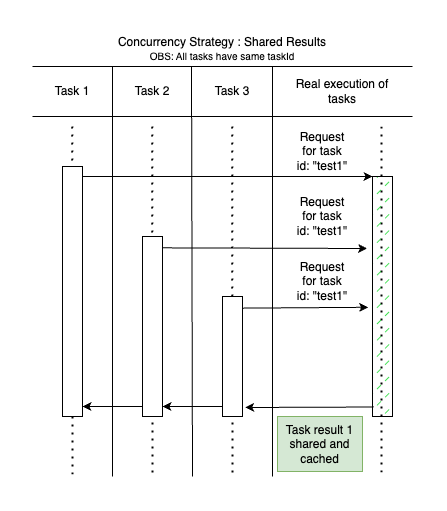
Optimize task execution with the Shared Results strategy. This method is ideal for tasks with identical outcomes, avoiding redundant work and saving resources.
How it Works
- Task 1 starts executing with a unique
taskId. The task manager oversees this process. - As Task 1 runs, Task 2 and Task 3 are called with the same
taskId. - Rather than running these tasks individually, the task manager links them to the same future as Task 1.
- After Task 1 finishes, its result is cached for future requests.
- Task 2 and Task 3 receive Task 1's outcome, preventing further executions.
- Any subsequent tasks with the same
taskIdwill retrieve the cached result, provided it hasn't expired. - A new execution cycle starts only after the cached result expires and a new identical task is requested.
Benefits
- Efficiency: Streamlines processing by reusing outcomes, enhancing performance for demanding tasks.
- Consistency: Ensures all requests for the same task get identical results, keeping your application synchronized.
- Resource Management: Reduces backend load through result caching, ideal for costly operations like API calls or database transactions.
Use Cases
- User Interfaces: Prevents multiple submissions from a user rapidly clicking a button more than once.
- API Requests: Best for infrequently changing data that can be distributed within your app.
- Heavy Computations: Great for computational-intensive tasks that are suitable for reuse.
- Data Fetching: Useful for data updated periodically, like financial tickers or news updates.
By implementing the Shared Results strategy, you can achieve more efficient use of resources and provide a seamless user experience by cutting down on needless task executions.
Sequential Queue ⏱️
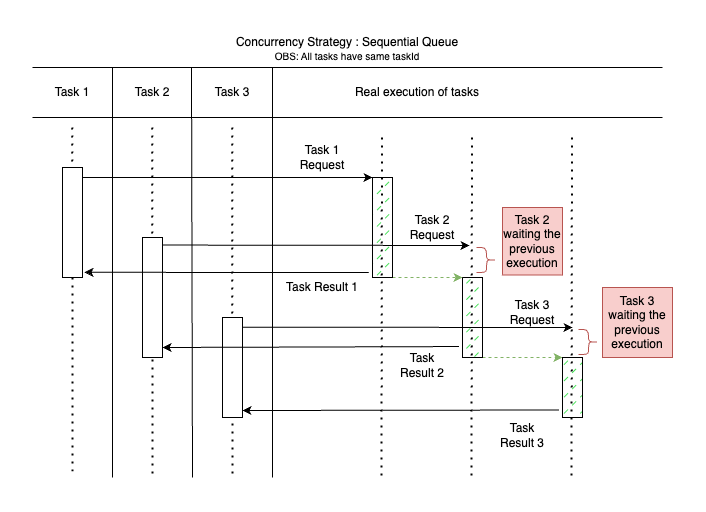
The Sequential Queue is a concurrency strategy that ensures tasks are executed one after another, in the order they were requested. This strategy is crucial when tasks must be completed in sequence to avoid conflicts or when the order of operations is essential for data integrity, as non-thread-safe operations or access to shared data.
How it Works
- When Task 1 is requested, it enters the queue and begins execution immediately.
- As Task 1 is processing, Task 2 is requested. Instead of starting immediately, Task 2 is placed in the queue.
- Task 1 completes and returns a result. Only then does Task 2 begin execution.
- If Task 3 is requested while Task 2 is executing, it will queue behind Task 2, waiting for it to complete before starting.
- This process ensures that each task is given the time and resources to complete before the next begins, maintaining a strict order of execution.
Benefits
- Order Preservation: Maintains the sequence of task execution as they are requested, which is essential for tasks that are dependent on the completion of previous tasks.
- Conflict Avoidance: Prevents race conditions by ensuring that tasks that could potentially interfere with each other are not executed simultaneously.
- Data Integrity: Guarantees that operations affecting shared data are performed in the correct order, preventing data corruption.
Use Cases
- Database Transactions: Ideal for operations where the sequence of database writes must be maintained to prevent data anomalies.
- Order Processing: Essential for e-commerce systems where orders must be processed in the order they are received.
- Event Handling: Useful for event-driven systems where events must be handled in a strict sequence to maintain application state integrity.
Implementing a Sequential Queue can be especially important in systems where the timing and sequence of task execution can have a significant impact on the outcome.
Reject After Threshold 🚫⛔
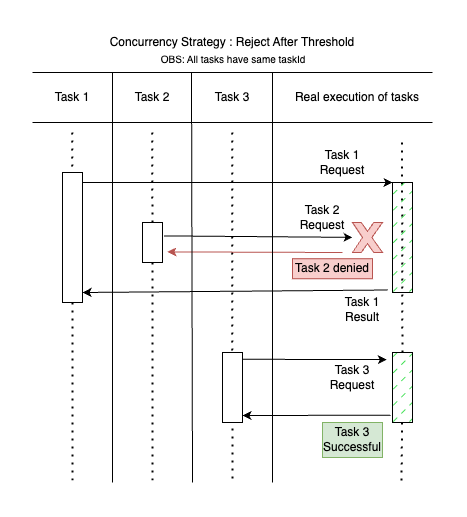
The Reject After Threshold strategy is essential in preventing system overload and unintended user actions. By setting a concurrency limit, this method ensures that excess tasks, which may arise from double taps or accidental triggers, do not overwhelm the system.
How it Works
- Task 1 initiates and is actively running.
- As Task 1 processes, a user's double tap results in Task 2 being requested. The system checks the number of concurrent tasks against the threshold.
- If the threshold is reached, Task 2 is rejected. This prevents the system from processing unintended tasks, conserving resources (depicted as Task 2 being denied in the diagram).
- Once Task 1 concludes and the concurrency level falls below the threshold, new tasks, such as Task 3, can commence without issue.
Benefits
- Protection Against Overload: Shields the system from an influx of tasks, intentionally or unintentionally initiated, preserving performance and stability.
- Mitigation of Unintended Actions: Specifically guards against unintended actions such as double taps or accidental submissions, which are common in user interfaces.
- Resource Optimization: Allocates system resources efficiently by only allowing a manageable number of tasks to execute simultaneously.
Use Cases
- User Interfaces: Prevents multiple submissions from a user rapidly clicking a button more than once.
- Web Servers: Protects servers from being overwhelmed by an excessive number of concurrent requests, which could cause service interruptions.
- Rate Limiting: Enforces rate limits on APIs to prevent abuse and ensure equitable resource distribution among users.
- Batch Operations: Manages the flow of batch jobs to prevent the initiation of new jobs when the system is at capacity, preserving orderly processing.
Incorporating the Reject After Threshold strategy can be particularly beneficial in user-facing applications where accidental multiple inputs are likely and in systems where resource control is paramount for maintaining service quality, or scenarios where it is better to deny service temporarily rather than compromise the entire system's stability or performance.
Task Pool 🏊
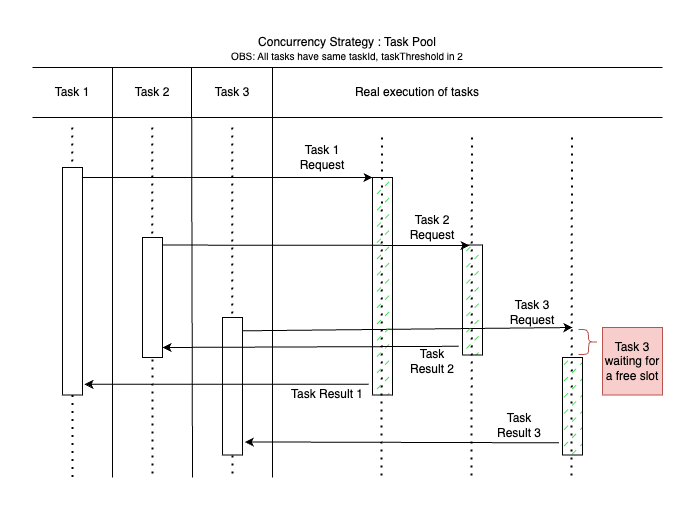
The Task Pool strategy effectively manages a finite set of resources by allowing a certain number of tasks to execute concurrently. When the limit is reached, additional tasks are queued and wait for an existing task to complete before they can start. This strategy is particularly useful for controlling the load on resources that cannot handle too many simultaneous accesses.
How it Works
- Task 1 begins execution as soon as it is requested.
- Subsequent requests, like Task 2, start immediately if there are free slots available in the pool.
- If the pool's limit is reached, as with Task 3, it enters a waiting state until a slot is freed.
- As each task completes, it releases its slot, and the next waiting task begins execution. This ensures that the resource usage is kept within the limits of the pool's capacity.
Benefits
- Resource Control: Prevents overloading resources by limiting the number of concurrent executions.
- Fair Scheduling: Queues tasks and ensures that they are executed in the order they are received, promoting fairness.
- Improved Throughput: Enhances the system's throughput by allowing multiple tasks to run concurrently up to the predefined limit.
Use Cases
- Database Connections: Manages database connection pools to prevent too many simultaneous connections that could lead to performance issues.
- Thread Management: Controls the number of threads running in parallel in an application to avoid excessive context switching and improve performance.
Cancel Previous Task ❌🔄
The Cancel Previous Task strategy is designed to ensure that only the most recent task in a series is executed. When a new task is initiated, any previous, still-running task with the same taskId is cancelled. This is particularly useful in scenarios where the outcome of the latest task is the only one that matters, such as in search functionalities where user input is frequent and only the result of the last input is relevant.

How it Works
- Task 1 is initiated and starts its execution.
- While Task 1 is still running, Task 2, with the same
taskId, is requested. - The task manager immediately cancels Task 1 (as depicted by the X in the diagram) and starts executing Task 2.
- If Task 3 is requested while Task 2 is running, Task 2 will be cancelled, and Task 3 will start.
- This ensures that system resources are not wasted on outdated tasks and that the application remains responsive to the latest user inputs.
Benefits
- Responsiveness: Keeps the application responsive by prioritizing the most recent user actions.
- Resource Efficiency: Prevents the execution of outdated tasks, saving computational resources and reducing system load.
- Up-to-Date Results: Ensures that the user is always presented with the results of their latest action, improving the user experience.
Use Cases
- Search Bars: Ideal for search functionalities where a new search query should cancel the previous one to avoid displaying irrelevant results.
- Real-time Data Filtering: Useful in applications that filter data in real-time based on user input, ensuring that only the results for the latest filter criteria are processed.
- Auto-saving Features: Can be used in text editors or forms where auto-saving is triggered by user input, with each new input cancelling the previous save request to avoid excessive writes.
By using the Cancel Previous Task strategy, you can build more responsive and efficient applications that prioritize the most current user actions.
Libraries
- awesome_task_manager
- The Awesome Task Manager is a powerful and flexible library for managing concurrent tasks in Flutter applications. It helps prevent race conditions, optimize resource usage, and provides fine-grained control over task execution.