
🚀 Flutter Background Socket Connect A Flutter plugin for establishing and maintaining persistent WebSocket connections with background service support, automatic reconnection, and keep-alive functionality.
✨ Features 🔌 Persistent WebSocket Connections - Maintain stable socket connections
📱 Background Service Support - Keep connections alive when app is in background
🔄 Automatic Reconnection - Smart reconnection with exponential backoff
🏓 Keep-Alive Management - Handle server ping/pong protocols automatically
🛡️ SSL/TLS Support - Secure connections with proper certificate handling
📊 Connection Status Monitoring - Real-time connection state tracking
🎯 Cross-Platform - Works on both Android & iOS
🔧 Highly Configurable - Custom headers, URLs, and connection options
🎥 Demo Video
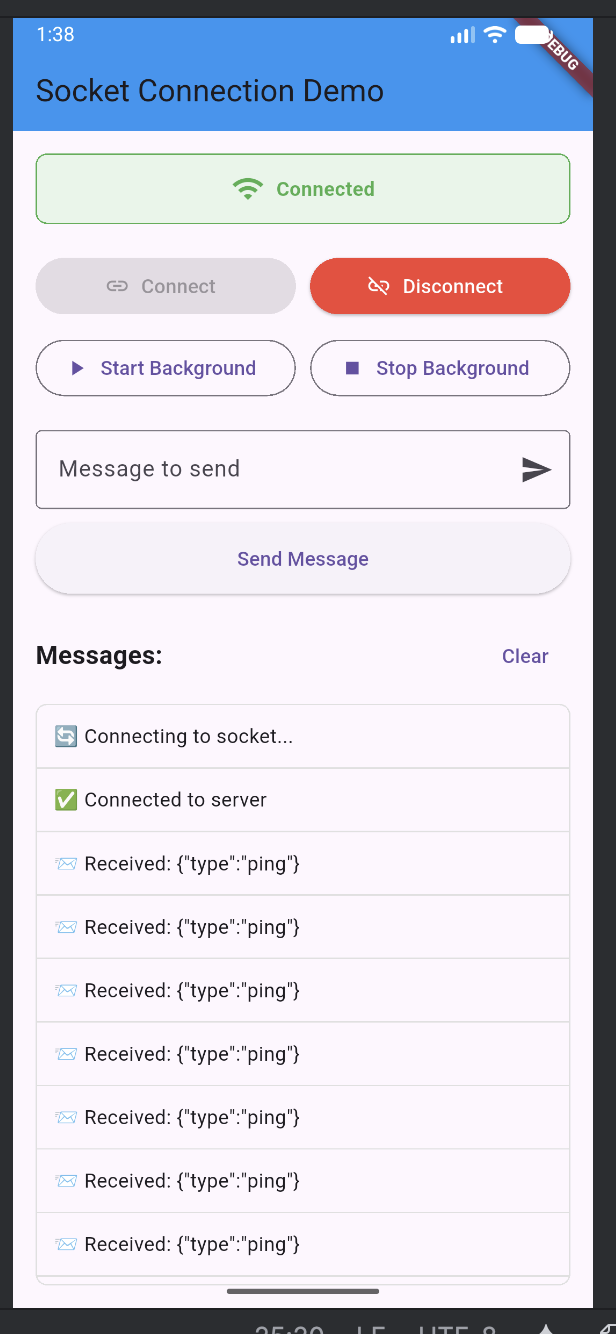
Click the image above to watch the demo video.
📦 Installation
Add dependency in your pubspec.yaml:
dependencies:
  background_socket_connect: latest
⚙️ Android Setup
- Permissions In android/app/src/main/AndroidManifest.xml, add:
<manifest xmlns:android="http://schemas.android.com/apk/res/android">
    <uses-permission android:name="android.permission.INTERNET" />
    <uses-permission android:name="android.permission.ACCESS_NETWORK_STATE" />
    <uses-permission android:name="android.permission.WAKE_LOCK" />
    <uses-permission android:name="android.permission.FOREGROUND_SERVICE" />

    <!-- For Android 9+ cleartext support -->
    <uses-permission android:name="android.permission.ACCESS_WIFI_STATE" />

    <application
        android:label="Your App"
        android:name="${applicationName}"
        android:usesCleartextTraffic="true"
        android:icon="@mipmap/ic_launcher">

        <!-- Your application content -->
    </application>
</manifest>
- Network Security Configuration (Optional) For development with ws:// connections, create android/app/src/main/res/xml/network_security_config.xml:
<?xml version="1.0" encoding="utf-8"?>
<network-security-config>
    <domain-config cleartextTrafficPermitted="true">
        <domain includeSubdomains="true">your-server-domain.com</domain>
        <domain includeSubdomains="true">localhost</domain>
        <domain includeSubdomains="true">10.0.2.2</domain>
    </domain-config>
</network-security-config>
- iOS Permissions
In ios/Runner/Info.plist, add:
<key>NSAppTransportSecurity</key>
<dict>
    <key>NSAllowsArbitraryLoads</key>
    <true/>
</dict>
cd ios
pod install
import 'package:background_socket_connect/background_socket_connect.dart';

class SocketManager {
  final BackgroundSocketConnectPlatform _socket = BackgroundSocketConnectPlatform.instance;

  void initialize() {
    _setupSocketCallbacks();
  }

  void _setupSocketCallbacks() {
    _socket.setOnConnectedCallback(() {
      print('✅ Connected to server');
    });

    _socket.setOnMessageCallback((message) {
      print('📨 Received: $message');
    });

    _socket.setOnDisconnectedCallback((code, reason) {
      print('❌ Disconnected: $reason (code: $code)');
    });

    _socket.setOnErrorCallback((error) {
      print('⚠️ Error: $error');
    });
  }

  Future<void> connect() async {
    await _socket.connect(
      url: 'wss://your-websocket-server.com/ws',
      headers: {
        'Authorization': 'Bearer your-token',
        'User-Agent': 'FlutterSocketClient/1.0',
      },
    );
  }

  Future<void> sendMessage(String message) async {
    await _socket.sendMessage(message);
  }

  Future<void> disconnect() async {
    await _socket.disconnect();
  }
}
flutter:
  assets:
    - assets/AppAsset/bike_icon.png
    - assets/AppAsset/pickup_icon.png
    - assets/AppAsset/destination_icon.png
Author


Navigation Features 🔧 Advanced Features Background Mode Enable background persistence:
// Enable background mode
await _socket.setBackgroundMode(true);

// Start background service
await _socket.startBackgroundService();

// Stop background service
await _socket.stopBackgroundService();
Connection Status
dart
// Check connection status
bool isConnected = await _socket.getConnectionStatus();
Custom Headers
dart
await _socket.connect(
url: 'wss://your-server.com/ws',
headers: {
'Authorization': 'Bearer your-token',
'User-Agent': 'CustomClient/1.0',
'X-Custom-Header': 'custom-value',
},
);
🎯 API Reference Methods Method Description Parameters connect() Establish WebSocket connection url, headers disconnect() Close WebSocket connection - sendMessage() Send message through WebSocket message setBackgroundMode() Enable/disable background persistence enabled startBackgroundService() Start background service - stopBackgroundService() Stop background service - getConnectionStatus() Check connection status - Callbacks Callback Description Parameters setOnConnectedCallback() Connection established - setOnMessageCallback() Message received message setOnDisconnectedCallback() Connection closed code, reason setOnErrorCallback() Error occurred error 🔄 Background Behavior Foreground: Normal WebSocket operation
Background: Automatic reconnection with exponential backoff
Reconnection: Smart retry logic (5s → 10s → 15s → 30s)
Network Changes: Automatic recovery on network restoration
🛠️ Troubleshooting Common Issues Connection fails with cleartext error
Add android:usesCleartextTraffic="true" to AndroidManifest
Use wss:// for production instead of ws://
Background connection drops
Enable background mode with setBackgroundMode(true)
Ensure proper permissions are granted
SSL/TLS errors
The plugin automatically handles SSL configuration for development
Use proper certificates for production
Ping/Pong protocol issues
The plugin automatically handles server ping messages
No manual ping/pong responses needed
📝 Notes ✅ Production Ready: Use wss:// for secure connections
✅ Auto-reconnection: Handles network failures gracefully
✅ Background Support: Maintains connections in background
✅ Cross-Platform: Works on both Android & iOS
✅ No Boilerplate: Simple API with comprehensive callbacks
👨💻 Author Amarjeet Kushwaha
GitHub: @Amarj234
LinkedIn: amarj234
📄 License This project is licensed under the MIT License - see the LICENSE file for details.
🎯 Roadmap Voice notification support
Offline message queuing
Multiple socket connections
Custom ping intervals
Connection quality monitoring
Battery optimization features
⭐ Star this repo if you find it helpful!