
Privacy Lens 🛡️
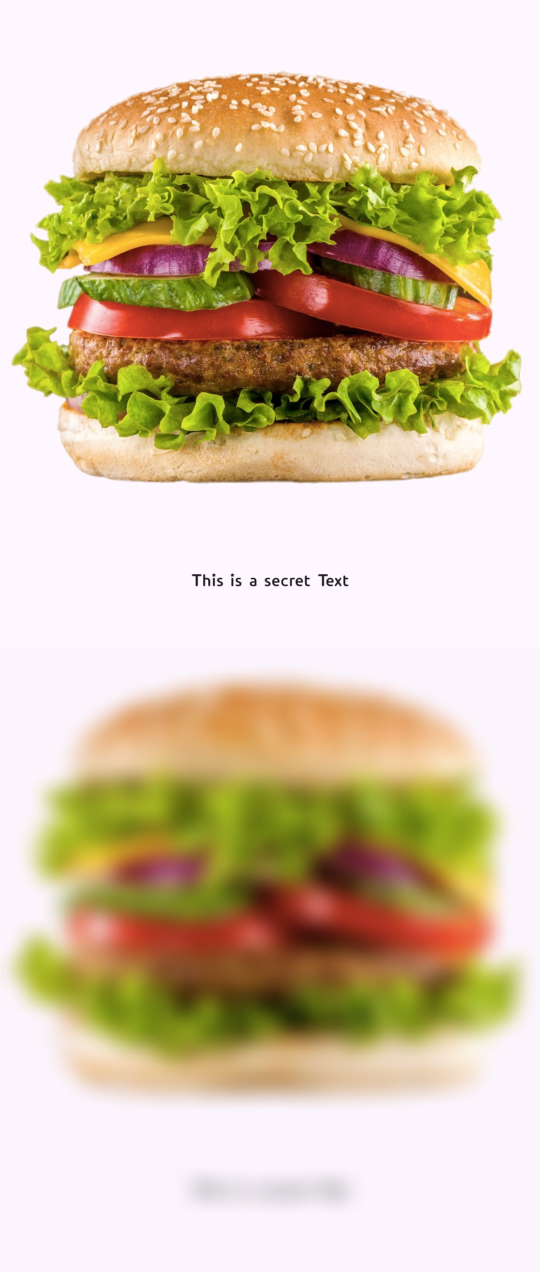
Privacy Lens is a lightweight, zero-dependency Flutter widget designed to protect sensitive UI content. It masks information (like credit card numbers, passwords, or personal data) from unauthorized screen captures and recordings by automatically blurring content when the app moves to the background or through manual/programmatic triggers.
🚀 Key Features
- Selective Masking: Protect specific parts of your UI or the entire screen.
- Auto-Blur on Background: Instantly obscures content when the app is inactive or in the App Switcher.
- NEW: Multiple Blur Styles: Choose between
Gaussian,Pixelate, or a premiumFrostedglass effect. - NEW: Scoped Protection: Programmatically control multiple widgets at once using the
PrivacyLensController. - Custom Overlays: Add logos, icons, or custom text over the protected area.
- Smooth Animations: High-performance fade-in/out blur effects.
- Zero-Dependency: Lightweight and extremely easy to integrate.
Preview
📥 Installation
Add privacy_lens to your pubspec.yaml file:
dependencies:
  privacy_lens: ^1.0.5
Then, run the following command in your terminal:
flutter pub get
⚡ Usage
1. Basic Usage
Automatically blurs when the app goes to the background.
import 'package:privacy_lens/privacy_lens.dart';

PrivacyLens(
  child: Text("Sensitive Data: 1234-5678-9012"),
)
2. Using Custom Blur Styles
Switch between standard blur, pixelation, or a stylish frosted glass effect.
PrivacyLens(
  blurType: PrivacyBlurType.frosted, // Premium glass look
  blurStrength: 15.0,
  overlayColor: Colors.blueGrey.withValues(alpha: 0.5),
  child: MySensitiveWidget(),
)
3. 3. Programmatic Control (Scoped Protection)
Manage the protection state from anywhere in your code using PrivacyLensController.
final privacyController = PrivacyLensController();

// Wrap your widget
PrivacyLens(
  controller: privacyController,
  child: SensitiveInfoCard(),
)

// Trigger it from a button or logic
void togglePrivacy() {
  privacyController.toggle();
}
⚙️ Properties
| Property | Type | Default | Description |
|---|---|---|---|
controller |
PrivacyLensController? |
null |
A controller to programmatically trigger protection across multiple widgets (Scoped Protection). |
blurType |
PrivacyBlurType |
PrivacyBlurType.gaussian |
Visual style of protection: gaussian, pixelate, or frosted. |
isProtected |
bool |
false |
If true, the blur effect remains active regardless of the app lifecycle state. |
blurStrength |
double |
10.0 |
Controls the intensity of the blur. Higher values result in a stronger blur effect. |
overlayColor |
Color |
Colors.black |
The tint color applied over the blur effect. Useful for matching your app's theme. |
privacyChild |
Widget? |
null |
A custom widget (e.g., a Lock Icon or Logo) to display in the center when blurred. |
enableInDebug |
bool |
true |
Whether the protection should be active in debug mode. Set to false for a better dev workflow. |
animationDuration |
Duration |
300ms |
The speed of the transition between blurred and unblurred states. |
Note: Even if isProtected is set to false, the widget will automatically apply the blur effect whenever the app lifecycle state changes to inactive or paused (e.g., when the app is in the background or the App Switcher is open).
⚙️ Toggle Privacy Properties
| Method / Property | Description |
|---|---|
show() |
Programmatically enables the protection layer (Active). |
hide() |
Programmatically disables the protection layer (Inactive). |
toggle() |
Toggles the current protection state (Switches between active and inactive). |
isGlobalProtected |
(Property) Returns a bool indicating whether the protection is currently active. |
🛠 Why Privacy Lens?
-
Privacy First:Build trust by ensuring sensitive data remains invisible during accidental screen captures or malicious recordings. -
Modern Aesthetic:Go beyond basic blur with professional pixelation or glassmorphism styles. -
Developer Experience:Clean, documented, and simple API that integrates seamlessly into any widget tree.
📧 Contact & Support
If you have any questions, feedback, or run into issues while using privacy_lens, feel free to reach out:
- Email: loomixdev@gmail.com
- GitHub: https://github.com/oxfaysal
I'm happy to help you with any improvements or fixes!