
SIT Utils
Google places autocomplete widgets for flutter.
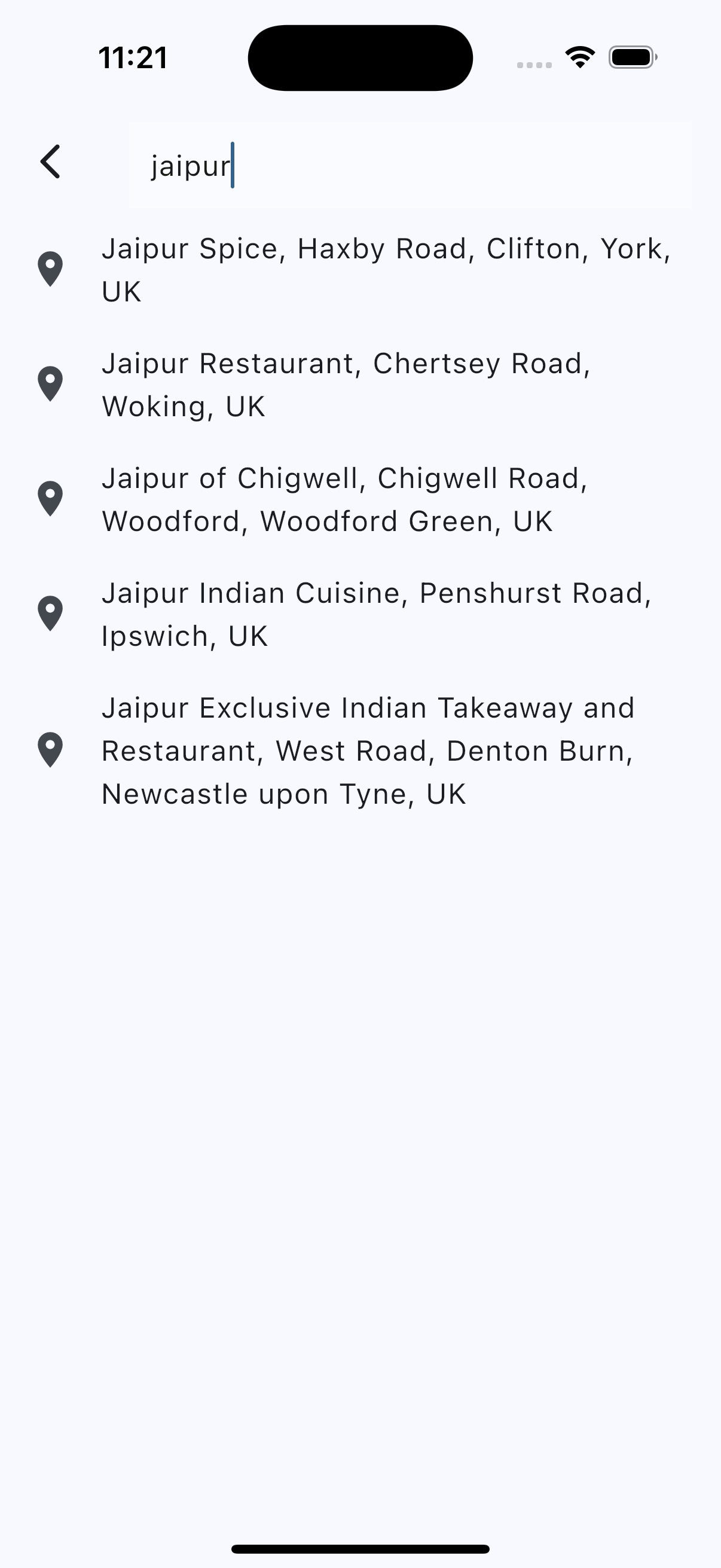
|
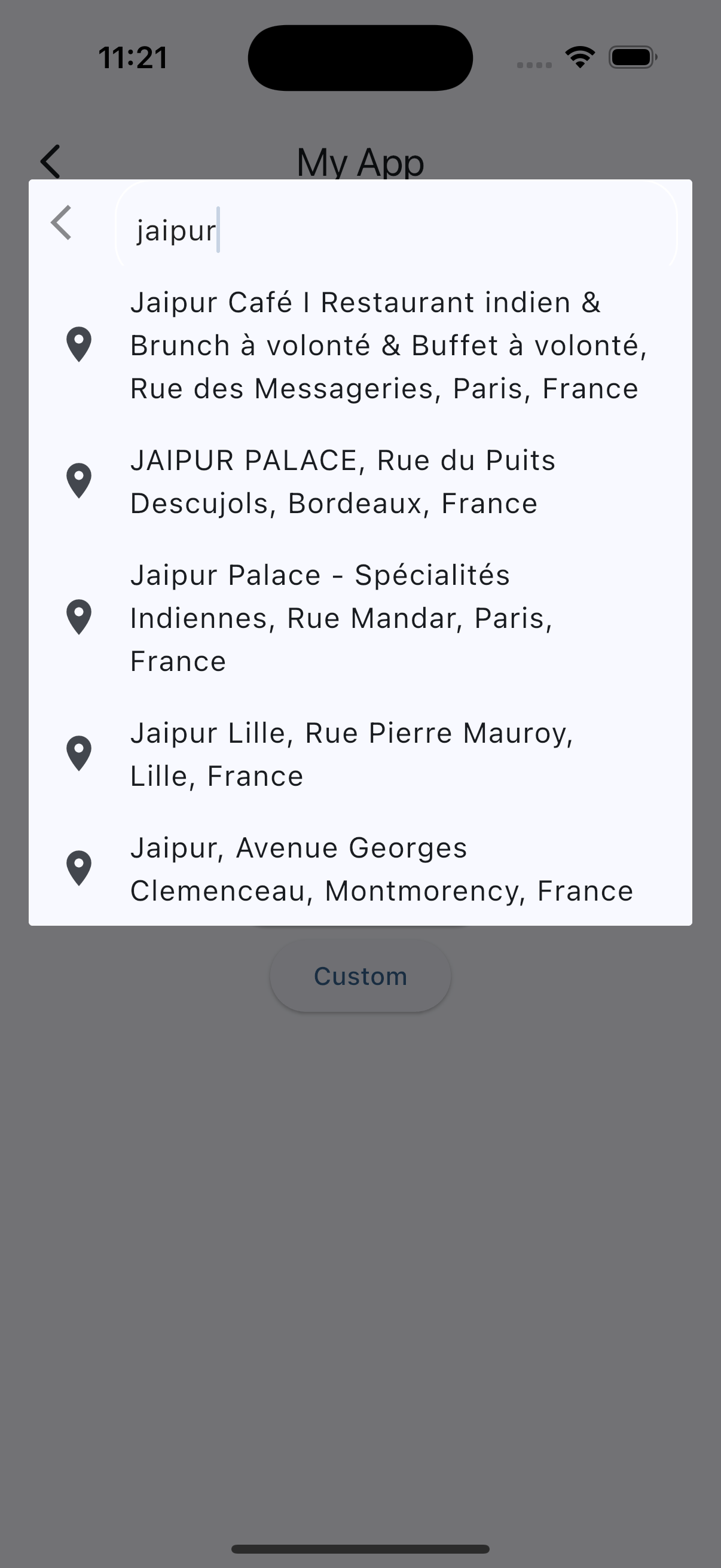
|
Getting Started
For help getting started with Flutter, view our online documentation.
# pubspec.yaml

dependencies:
  flutter:
    sdk: flutter
  sit_utils: <last-version>
const kGoogleApiKey = "API_KEY";

Prediction p = await PlacesAutocomplete.show(
                          context: context,
                          apiKey: kGoogleApiKey,
                          mode: Mode.overlay, // Mode.fullscreen
                          language: "fr",
                          components: [new Component(Component.country, "fr")]);
SIT Dropdown
SIT Dropdown package lets you add customizable dropdown widget.
If you like this package, please leave a like on pub.dev .
Features
Lots of properties to use and customize dropdown widget as per your need. Also usable under Form widget for required validation.
- SIT Dropdown using constructor SIT_Dropdown
- SIT Dropdown with search field using named constructor SIT_Dropdown
- SIT Dropdown with search request field using named constructor SIT_Dropdown
- Multi select SIT Dropdown using named constructor SIT_Dropdown
- Multi select SIT Dropdown with search field using named constructor SIT_Dropdown
- Multi select SIT Dropdown with search request field using named constructor SIT_Dropdown
Preview
Getting started
- Add the latest version of package to your
pubspec.yaml(and runflutter pub get):
dependencies:
  sit_utils: 1.0.0
- Import the package and use it in your Flutter App.
import 'package:sit_utils/sit_dropdown.dart';
Example usage
1. SIT Dropdown
import 'package:sit_utils/sit_dropdown.dart';
import 'package:flutter/material.dart';
import 'dart:developer';

const List<String> _list = [
    'Flutter Developer',
    'UI UX Designer',
    'Tester',
    'Team Lead',
  ];

class SimpleDropdown extends StatelessWidget {
  const SimpleDropdown({Key? key}) : super(key: key);

  @override
  Widget build(BuildContext context) {
    return SIT_Dropdown<String>(
      hintText: 'Select job role for IT',
      items: _list,
      initialItem: _list[0],
      onChanged: (value) {
        log('changing value to: $value');
      },
    );
  }
}
2. SIT Dropdown with custom type model
Let's start with the type of object we are going to work with:
class Job {
  final String name;
  final IconData icon;
  const Job(this.name, this.icon);

  @override
  String toString() {
    return name;
  }
}
Whenever you are going to work with custom type model T, your model must override the default toString() method and return the property inside that you want to display as list item otherwise the dropdown list item would show Instance of [model name].
Now the widget:
import 'package:sit_utils/sit_dropdown.dart';
import 'package:flutter/material.dart';
import 'dart:developer';

const List<Job> _list = [
    Job('Flutter Developer', Icons.developer_mode),
    Job('UI UX Designer', Icons.design_services),
    Job('Tester', Icons.audiotrack),
    Job('Team Lead', Icons.beach_access),
  ];

class SimpleDropdown extends StatelessWidget {
  const SimpleDropdown({Key? key}) : super(key: key);

  @override
  Widget build(BuildContext context) {
    return SIT_Dropdown<Job>(
      hintText: 'Select job role for IT',
      items: _list,
      onChanged: (value) {
        log('changing value to: $value');
      },
    );
  }
}
3. SIT Dropdown with multiple selection
import 'package:sit_utils/sit_dropdown.dart';
import 'package:flutter/material.dart';
import 'dart:developer';

const List<Job> _list = [
    Job('Flutter Developer', Icons.developer_mode),
    Job('UI UX Designer', Icons.design_services),
    Job('Tester', Icons.audiotrack),
    Job('Team Lead', Icons.beach_access),
  ];

class MultiSelectDropDown extends StatelessWidget {
  const MultiSelectDropDown({Key? key}) : super(key: key);

  @override
  Widget build(BuildContext context) {
    return SIT_Dropdown<Job>.multiSelect(
        items: _jobItems,
        initialItems: _jobItems.take(1).toList(),
        onListChanged: (value) {
          log('changing value to: $value');
        },
      );
  }
}
4. SIT Dropdown with search: A SIT Dropdown with the possibility to filter the items.
First, let's enhance our Job model with more functionality:
class Job with SIT_DropdownListFilter {
  final String name;
  final IconData icon;
  const Job(this.name, this.icon);

  @override
  String toString() {
    return name;
  }

  @override
  bool filter(String query) {
    return name.toLowerCase().contains(query.toLowerCase());
  }
}
If the filter on the object is more complex, you can add the SIT_DropdownListFilter mixin to it, which gives you access to the filter(query) method, and by this the items of the list will be filtered.
Now the widgets:
SearchDropdown
import 'package:sit_utils/sit_dropdown.dart';
import 'package:flutter/material.dart';
import 'dart:developer';

const List<Job> _list = [
    Job('Flutter Developer', Icons.developer_mode),
    Job('UI UX Designer', Icons.design_services),
    Job('Tester', Icons.audiotrack),
    Job('Team Lead', Icons.beach_access),
  ];

class SearchDropdown extends StatelessWidget {
  const SearchDropdown({Key? key}) : super(key: key);

  @override
  Widget build(BuildContext context) {
    return SIT_Dropdown<Job>.search(
      hintText: 'Select job role for IT',
      items: _list,
      excludeSelected: false,
      onChanged: (value) {
        log('changing value to: $value');
      },
    );
  }
}
MultiSelectSearchDropdown
import 'package:sit_utils/sit_dropdown.dart';
import 'package:flutter/material.dart';
import 'dart:developer';

const List<Job> _list = [
    Job('Flutter Developer', Icons.developer_mode),
    Job('UI UX Designer', Icons.design_services),
    Job('Tester', Icons.audiotrack),
    Job('Team Lead', Icons.beach_access),
  ];

class MultiSelectSearchDropdown extends StatelessWidget {
  const SearchDropdown({Key? key}) : super(key: key);

  @override
  Widget build(BuildContext context) {
    return SIT_Dropdown<Job>.multiSelectSearch(
      hintText: 'Select job role for IT',
      items: _list,
      onListChanged: (value) {
        log('changing value to: $value');
      },
    );
  }
}
5. SIT Dropdown with search request: A SIT Dropdown with a search request to load the items.
Let's use a personalized object for the items:
class Pair {
  final String text;
  final IconData icon;
  const Pair(this.text, this.icon);

  @override
  String toString() {
    return text;
  }
}
Now the widgets:
SearchRequestDropdown
import 'package:sit_utils/sit_dropdown.dart';
import 'package:flutter/material.dart';
import 'dart:developer';

const List<Pair> _list = [
    Job('Flutter Developer', Icons.developer_mode),
    Job('UI UX Designer', Icons.design_services),
    Job('Tester', Icons.audiotrack),
    Job('Team Lead', Icons.beach_access),
  ];

class SearchRequestDropdown extends StatelessWidget {
  const SearchRequestDropdown({Key? key}) : super(key: key);

  // This should be a call to the api or service or similar
  Future<List<Pair>> _getFakeRequestData(String query) async {
    return await Future.delayed(const Duration(seconds: 1), () {
      return _list.where((e) {
        return e.text.toLowerCase().contains(query.toLowerCase());
      }).toList();
    });
  }

  @override
  Widget build(BuildContext context) {
    return SIT_Dropdown<Pair>.searchRequest(
      futureRequest: _getFakeRequestData,
      hintText: 'Search job role for IT',
      items: _list,
      onChanged: (value) {
        log('changing value to: $value');
      },
    );
  }
}
MultiSelectSearchRequestDropdown
import 'package:sit_utils/sit_dropdown.dart';
import 'package:flutter/material.dart';
import 'dart:developer';

const List<Pair> _list = [
    Job('Flutter Developer', Icons.developer_mode),
    Job('UI UX Designer', Icons.design_services),
    Job('Tester', Icons.audiotrack),
    Job('Team Lead', Icons.beach_access),
  ];

class MultiSelectSearchRequestDropdown extends StatelessWidget {
  const MultiSelectSearchRequestDropdown({Key? key}) : super(key: key);

  // This should be a call to the api or service or similar
  Future<List<Pair>> _getFakeRequestData(String query) async {
    return await Future.delayed(const Duration(seconds: 1), () {
      return _list.where((e) {
        return e.text.toLowerCase().contains(query.toLowerCase());
      }).toList();
    });
  }

  @override
  Widget build(BuildContext context) {
    return SIT_Dropdown<Pair>.multiSelectSearchRequest(
      futureRequest: _getFakeRequestData,
      hintText: 'Search job role for IT',
      onListChanged: (value) {
        log('changing value to: $value');
      },
    );
  }
}
6. SIT Dropdown with validation: A SIT Dropdown with validation.
ValidationDropdown
import 'package:sit_utils/sit_dropdown.dart';
import 'package:flutter/material.dart';
import 'dart:developer';

const List<String> _list = [
    'Flutter Developer',
    'UI UX Designer',
    'Tester',
    'Team Lead',
  ];

class ValidationDropdown extends StatelessWidget {
  ValidationDropdown({Key? key}) : super(key: key);

  final _formKey = GlobalKey<FormState>();

  @override
  Widget build(BuildContext context) {
    return Form(
      key: _formKey,
      child: Column(
        crossAxisAlignment: CrossAxisAlignment.start,
        children: [
          SIT_Dropdown<String>(
            hintText: 'Select job role for IT',
            items: _list,
            onChanged: (value) {
              log('changing value to: $value');
            },
            // Run validation on item selected
            validateOnChange: true,
            // Function to validate if the current selected item is valid or not
            validator: (value) => value == null ? "Must not be null" : null,
          ),
          const SizedBox(height: 16),
          SizedBox(
            width: double.infinity,
            child: ElevatedButton(
              onPressed: () {
                if (!_formKey.currentState!.validate()) return;
              },
              child: const Text(
                'Submit',
                style: TextStyle(fontWeight: FontWeight.w600),
              ),
            ),
          ),
        ],
      ),
    );
  }
}
MultiSelectValidationDropdown
import 'package:sit_utils/sit_dropdown.dart';
import 'package:flutter/material.dart';
import 'dart:developer';

const List<String> _list = [
    'Flutter Developer',
    'UI UX Designer',
    'Tester',
    'Team Lead',
  ];

class MultiSelectValidationDropdown extends StatelessWidget {
  MultiSelectValidationDropdown({Key? key}) : super(key: key);

  final _formKey = GlobalKey<FormState>();

  @override
  Widget build(BuildContext context) {
    return Form(
      key: _formKey,
      child: Column(
        crossAxisAlignment: CrossAxisAlignment.start,
        children: [
          SIT_Dropdown<String>.multiSelect(
            hintText: 'Select job role for IT',
            items: _list,
            onListChanged: (value) {
              log('changing value to: $value');
            },
            listValidator: (value) => value.isEmpty ? "Must not be null" : null,
          ),
          const SizedBox(height: 16),
          SizedBox(
            width: double.infinity,
            child: ElevatedButton(
              onPressed: () {
                if (!_formKey.currentState!.validate()) return;
              },
              child: const Text(
                'Submit',
                style: TextStyle(fontWeight: FontWeight.w600),
              ),
            ),
          ),
        ],
      ),
    );
  }
}
Libraries
- google_places/sit_utils_google_places
- google_places/src/GoogleApiHeaders
- google_places/src/my_platform
- google_places/src/places_autocomplete_field
- google_places/src/places_autocomplete_form_field
- google_places/src/sit_utils_google_places
- Pin_code_field/constants
- Pin_code_field/pin_code_fields
- Pin_code_field/src/cursor_painter
- Rating/flutter_rating_bar
- Rating/src/rating_bar
- Rating/src/rating_bar_indicator
- Sit_audio_waveflow/audio_waveforms
- Sit_audio_waveflow/chat_bubble
- Sit_audio_waveflow/src/audio_file_waveforms
- Sit_audio_waveflow/src/audio_waveforms
- Sit_audio_waveflow/src/base/constants
- Sit_audio_waveflow/src/base/label
- Sit_audio_waveflow/src/base/platform_streams
- Sit_audio_waveflow/src/base/player_identifier
- Sit_audio_waveflow/src/base/player_wave_style
- Sit_audio_waveflow/src/base/utils
- Sit_audio_waveflow/src/base/wave_clipper
- Sit_audio_waveflow/src/base/wave_style
- Sit_audio_waveflow/src/controllers/player_controller
- Sit_audio_waveflow/src/controllers/recorder_controller
- Sit_audio_waveflow/src/painters/player_wave_painter
- Sit_audio_waveflow/src/painters/recorder_wave_painter
- sit_dropdown
- Sit_shimmer/placeholders
- Sit_shimmer/sit_shimmer
- A package provides an easy way to add shimmer effect to Flutter application
- Slidable/flutter_slidable
- Slidable/src/action_pane_configuration
- Slidable/src/action_pane_motions
- Slidable/src/actions
- Slidable/src/auto_close_behavior
- Slidable/src/controller
- Slidable/src/dismissal
- Slidable/src/dismissible_pane
- Slidable/src/dismissible_pane_motions
- Slidable/src/flex_entrance_transition
- Slidable/src/flex_exit_transition
- Slidable/src/gesture_detector
- Slidable/src/notifications
- Slidable/src/notifications_old
- Slidable/src/scrolling_behavior
- Slidable/src/slidable
- textstylesset/src/core/Textstyles_parser
- textstylesset/src/core/Textstyleset_controller
- textstylesset/src/core/Textstyleset_reserved
- textstylesset/src/core/textstyleset_reserved
- textstylesset/src/models/style_type_enum
- textstylesset/src/models/style_type_value_model
- textstylesset/src/view/typeset
- textstylesset/src/view/typeset_editing_controller
- textstylesset/src/view/typeset_ext
- textstylesset/typeset
- This supports the input from backend to be formatted with different formatters