
ble_keeper 0.1.0-beta.2  ble_keeper: ^0.1.0-beta.2 copied to clipboard
Keeps a BLE peripheral connected in the background, after the app is killed and after a reboot, on Android and iOS, and reports when the OS blocks it.
ble_keeper #
Keeps a BLE peripheral connected while your Flutter app is in the background, after the OS kills it, and after the phone reboots, on Android and iOS. When the OS does not allow that (user force-quit, Bluetooth off, missing permission), it tells you instead of failing silently.
Pre-release (0.1.0-beta.2). Android is verified on real hardware. iOS was tested on an iPhone 13 (iOS 26.6) with profile and release builds made with Xcode 16.3 (see Verified on); the two iOS issues found in that run are fixed in this version but not yet re-tested on the device.
Why #
BLE plugins such as flutter_blue_plus run their connection logic inside the Flutter engine. When the engine goes away (UI closed, process killed), so does the connection, and full background support is out of scope for those plugins (flutter_blue_plus issue #846).
ble_keeper owns the connection in native code that does not depend on the Flutter UI:
- Android: a foreground service of type
connectedDeviceholds the GATT connections and restarts after process death, reboot and app updates. - iOS: a
CBCentralManagerwith Core Bluetooth state restoration, so iOS keeps the connection and relaunches the app in the background.
Dart sends commands and receives events. When no UI is running, events go to a background handler in a headless Flutter engine.
It is not a general BLE library: no scanning, no GATT server, no OTA. Use it next to a scanning plugin.
Expected behavior (hardware verification in progress) #
The tables below describe what the implementation is designed to do, based on
the platform documentation. They are not yet verified on real devices; see
"Verified on" below and tools/HARDWARE_CHECKLIST.md in the repository.
Android:
| Situation | Connection kept? | What you get |
|---|---|---|
| App in background, screen off | Yes (foreground service) | Events as usual |
| UI closed / swiped from recents | Yes on stock Android; some OEMs kill the service (see Troubleshooting) | Events in the background handler |
| Process killed by the system (memory) | Restarted by the system (sticky service) | RestoredAfterKill |
adb shell am kill |
Not affected (a process with a foreground service is not "background") | Nothing |
Force-stop (Settings, am force-stop, Task Manager "Stop") |
No. Android keeps a force-stopped app stopped until the user opens it | Blocked(UserForceQuit) on the next launch (API 30+) |
| Reboot | Yes after first unlock, when restartOnBoot is true |
RestoredAfterKill |
| App update | Yes | RestoredAfterKill |
| Bluetooth turned off | Paused, reconnects when turned on | Disconnected(bluetoothOff), Blocked(BluetoothOff) |
BLUETOOTH_CONNECT denied (Android 12+) |
No | Blocked(PermissionMissing) |
keepConnected called while the app is in the background |
No (Android 12+ background start restriction) | Blocked(ForegroundStartNotAllowed) |
| Device absent for a long time | Keeps waiting at low power (autoConnect after the first minutes) |
Reconnecting once per attempt |
Restart timing after a system kill and boot behaviour on Android 15+ depend on the vendor build.
iOS (per Apple TN3115, "Bluetooth State Restoration app relaunch rules", updated for iOS 26 on 2025-09-15):
| Situation | Relaunched, iOS 15-18 | Relaunched, iOS 26+ | What you get |
|---|---|---|---|
| App suspended in the background | Not needed: iOS keeps the connection and wakes the app | same | Events as usual |
| Terminated by the system (memory) | Yes | Yes | RestoredAfterKill |
| Crash | Yes | Yes | RestoredAfterKill |
| Reboot | Yes, after the first unlock, when a Bluetooth event occurs | same | RestoredAfterKill |
| User force-quit (swipe up in the app switcher) | No | No (only AccessorySetupKit apps) | Blocked(UserForceQuit) on the next launch, best effort |
| Bluetooth turned off in Settings | No | No | Blocked(BluetoothOff) while off |
| Bluetooth toggled in Control Center | Yes | No (only AccessorySetupKit apps) | Reconnects when the user opens the app |
| Airplane Mode toggled | Yes, if Airplane Mode is configured not to turn Bluetooth off | No (only AccessorySetupKit apps) | Reconnects when the user opens the app |
| Bluetooth permission denied | No | No | Blocked(PermissionMissing('bluetooth')) |
| App update | No | No | Reconnects when the user opens the app |
ble_keeper does not use AccessorySetupKit yet (see Roadmap), so on iOS 26 the "only AccessorySetupKit apps" rows mean no relaunch.
iOS does not tell an app that the user force-quit it. ble_keeper infers it on
the next launch: connections were being kept, the app was not relaunched by
state restoration, and either applicationWillTerminate ran or nothing else
explains it. Both are guesses and the event detail says "best effort". False
positives:
applicationWillTerminatealso runs when the system terminates an app that was running (not suspended) in the background.- Bluetooth turned off in Settings, or (iOS 26) toggled in Control Center or by Airplane Mode, while the app was suspended.
- A reboot after which the peripheral never came in range before the user opened the app.
- A system termination with no Bluetooth event before the user opened the app.
Verified on #
Only tests that passed on real devices are listed. Test IDs are the numbers in
tools/HARDWARE_CHECKLIST.md; details and evidence are in
test-results/RESULTS.md in the repository.
| Device | OS version | Test IDs passed | Date |
|---|---|---|---|
Samsung Galaxy A53 5G (central, debug and release builds; peripheral: Galaxy S20 5G, Android 13, running tools/android_test_peripheral, bonded) |
Android 16, One UI 8.0 | 1 (20 min screen off in forced deep Doze), 2, 3, 4, 8, 9, 13 (swipe from recents + 30 min screen off), 14, 15, 16; also app update (MY_PACKAGE_REPLACED), peer-initiated link loss, and the peripheral disappearing for about 80 s and coming back (pending reconnect, no polling) |
2026-10-14 |
Apple iPhone 13 (central, profile and release builds made with Xcode 16.3 / iOS 18.4 SDK; peripheral: Galaxy S20 5G, Android 13, running tools/android_test_peripheral, LE-bonded) |
iOS 26.6 | 1 (37 min in background, locked), 9 (Bluetooth toggled in Settings and in Control Center, app in background), 10 (phone reboot: relaunched after the first unlock without opening the app), 12 (swipe force-quit: not relaunched, Blocked(userForceQuit) on the next launch, session resumes), 21 (notification during a restoration relaunch delivered); also peer-initiated link loss with automatic reconnect in the background, and a restoration relaunch after the app was replaced by an install (queued notifications delivered) |
2026-10-14 |
Install #
flutter pub add ble_keeper
Requires Flutter 3.44 or later, Android 7.0 (API 24) or later, iOS 15 or later.
Android setup #
The plugin's manifest adds these permissions to your app:
| Permission | Why |
|---|---|
BLUETOOTH_CONNECT |
Connect and use GATT (runtime permission on Android 12+) |
BLUETOOTH, BLUETOOTH_ADMIN (maxSdkVersion=30) |
Same, Android 11 and lower |
FOREGROUND_SERVICE, FOREGROUND_SERVICE_CONNECTED_DEVICE |
The foreground service (type connectedDevice) |
POST_NOTIFICATIONS |
Show the service notification (runtime permission on Android 13+) |
RECEIVE_BOOT_COMPLETED |
Restart after reboot (AndroidOptions.restartOnBoot) |
It does not declare BLUETOOTH_SCAN or location: ble_keeper never scans.
Your scanning plugin declares what it needs.
The plugin does not request runtime permissions. Request
BLUETOOTH_CONNECT (and POST_NOTIFICATIONS on Android 13+) before calling
keepConnected. If POST_NOTIFICATIONS is denied the service still runs;
Android only hides its notification. For example with
permission_handler.
permission_handler 13.x requires compileSdk 37, while Flutter 3.47 apps
compile against 36; either use flutter pub add "permission_handler:^12.0.1"
or raise compileSdk in android/app/build.gradle.kts:
import 'dart:io';
import 'package:permission_handler/permission_handler.dart';

Future<bool> ensureBlePermissions() async {
  if (!Platform.isAndroid) return true; // iOS shows its own prompt.
  final results = await [
    Permission.bluetoothConnect, // Android 12+; granted below 12
    Permission.notification, // Android 13+; optional
  ].request();
  return results[Permission.bluetoothConnect]?.isGranted ?? false;
}
If you also scan (with another plugin), request Permission.bluetoothScan and,
on Android 11 and lower, location, as that plugin documents.
Call keepConnected while your app is visible. Android 12 and later do not
allow starting a foreground service from the background; you get
Blocked(ForegroundStartNotAllowed) instead.
Notification icon. Pass the name of a monochrome drawable in your app:
const AndroidOptions(
  notificationTitle: 'Sensor connected',
  notificationText: 'Receiving data in the background',
  notificationIcon: 'ic_stat_bluetooth', // res/drawable/ic_stat_bluetooth.xml
)
The icon is looked up by name, so resource shrinking may remove it in release
builds. Keep it with android/app/src/main/res/raw/keep.xml:
<resources xmlns:tools="http://schemas.android.com/tools"
    tools:keep="@drawable/ic_stat_bluetooth" />
Without an icon the plugin uses its own Bluetooth glyph. The default texts
are string resources (ble_keeper_channel_name,
ble_keeper_notification_text) that you can override or translate.
Google Play. Apps targeting Android 14+ must declare foreground service
types in the Play Console (App content > Foreground service permissions).
Declare connectedDevice and describe the user-visible feature (for example
"keeps the heart-rate strap connected during a workout").
Opt out of boot restart. Set restartOnBoot: false, or remove the
permission in your manifest (add
xmlns:tools="http://schemas.android.com/tools" to its <manifest> tag):
<uses-permission android:name="android.permission.RECEIVE_BOOT_COMPLETED"
    tools:node="remove" />
Requirements. Flutter 3.44 or later (built-in Kotlin support), minSdk 24. The plugin compiles against SDK 36.
iOS setup #
Info.plist (both keys are required; a missing usage description makes Core Bluetooth terminate the app):
<key>NSBluetoothAlwaysUsageDescription</key>
<string>Connects to your sensor and keeps it connected in the background.</string>
<key>UIBackgroundModes</key>
<array>
  <string>bluetooth-central</string>
</array>
Without bluetooth-central the plugin still connects in the foreground, but
iOS suspends the connection with the app and state restoration is disabled;
you get Blocked(Misconfigured(...)).
AppDelegate. State restoration requires the central manager to be created
during application(_:didFinishLaunchingWithOptions:). When iOS relaunches
the app in the background, no scene and no Flutter UI engine is created, so
normal plugin registration does not happen. Add one call before super.
Apps created with Flutter 3.41 or later (UIScene template, SceneDelegate.swift
present, AppDelegate adopts FlutterImplicitEngineDelegate):
import Flutter
import UIKit
import ble_keeper

@main
@objc class AppDelegate: FlutterAppDelegate, FlutterImplicitEngineDelegate {
  override func application(
    _ application: UIApplication,
    didFinishLaunchingWithOptions launchOptions: [UIApplication.LaunchOptionsKey: Any]?
  ) -> Bool {
    BleKeeperPlugin.bootstrap(launchOptions: launchOptions) { registry in
      GeneratedPluginRegistrant.register(with: registry)
    }
    return super.application(application, didFinishLaunchingWithOptions: launchOptions)
  }

  func didInitializeImplicitFlutterEngine(_ engineBridge: FlutterImplicitEngineBridge) {
    GeneratedPluginRegistrant.register(with: engineBridge.pluginRegistry)
  }
}
Apps created before Flutter 3.41 (classic template, no SceneDelegate.swift,
plugins registered in didFinishLaunchingWithOptions):
import Flutter
import UIKit
import ble_keeper

@main
@objc class AppDelegate: FlutterAppDelegate {
  override func application(
    _ application: UIApplication,
    didFinishLaunchingWithOptions launchOptions: [UIApplication.LaunchOptionsKey: Any]?
  ) -> Bool {
    BleKeeperPlugin.bootstrap(launchOptions: launchOptions) { registry in
      GeneratedPluginRegistrant.register(with: registry)
    }
    GeneratedPluginRegistrant.register(with: self)
    return super.application(application, didFinishLaunchingWithOptions: launchOptions)
  }
}
The closure registers plugins on the headless engine used for the background
handler. If the call is missing, you get Blocked(Misconfigured(...)) when
the UI listens to events.
Requirements: iOS 15 or later. Both Swift Package Manager (the Flutter 3.47 default) and CocoaPods work.
App Store review. Guideline 2.5.4 allows background modes only for their intended purpose. Explain in the review notes which Bluetooth accessory the app keeps connected and why that needs the background (for example continuous sensor logging). There are no entitlement changes.
Device IDs on iOS are CBPeripheral.identifier UUIDs. They are assigned
per app install, so get them from a scan in your own app (a UUID copied from
another app does not work) and store them; after a reinstall you need to scan
again.
Usage #
import 'dart:typed_data';

import 'package:ble_keeper/ble_keeper.dart';

final counter = CharacteristicRef(
  serviceUuid: '12345678-1234-1234-1234-1234567890ab',
  characteristicUuid: '12345678-1234-1234-1234-1234567890ac',
);

Future<void> start(String deviceId) async {
  // Android: MAC address, e.g. 'AA:BB:CC:DD:EE:FF'. iOS: peripheral UUID.
  await BleKeeper.instance.keepConnected(
    deviceId: deviceId,
    subscribe: [counter],
    android: const AndroidOptions(notificationTitle: 'Sensor connected'),
  );
}

// Show statuses in your UI rather than printing them: events contain device
// IDs, and console output can end up in crash-reporter breadcrumbs.
void listen({
  required void Function(Uint8List value) onValue,
  required void Function(String status) onStatus,
}) {
  BleKeeper.instance.events.listen((event) {
    switch (event) {
      case Data(:final bytes):
        onValue(bytes);
      case Connected():
        onStatus('connected');
      case Disconnected(:final reason):
        onStatus('disconnected: ${reason.name}');
      case Reconnecting(:final attempt):
        onStatus('reconnecting, attempt $attempt');
      case RestoredAfterKill():
        onStatus('restored after the OS killed the app');
      case Blocked(:final reason):
        onStatus('the OS does not allow it: $reason');
    }
  });
}
Other calls:
await BleKeeper.instance.write(deviceId, command, Uint8List.fromList([1]));
final value = await BleKeeper.instance.read(deviceId, someCharacteristic);
await BleKeeper.instance.stop(deviceId);          // disconnect and forget
final ids = await BleKeeper.instance.activeDeviceIds();
keepConnected is persisted: the plugin keeps reconnecting until you call
stop, also across app restarts. Calling it again for the same device
replaces its subscriptions and options. Several devices can be kept at once.
keepConnected returns when the request is accepted, not when the device is
connected. Connected means services are discovered and every subscription
is enabled. Problems the OS imposes arrive as Blocked events. Programming
errors complete the returned future with an ArgumentError (bad UUID, empty
subscription list, more than 32 subscriptions, notification texts over 256
characters, a closure passed to registerBackgroundHandler). Platform errors
complete it with a BleKeeperException whose code is for example
not_connected, payload_too_large or timeout.
Event buffer. Events are buffered natively while no Dart listener (and no
background handler) is attached, and delivered in order when one attaches.
The buffer holds up to 1000 Data events; when it is full the oldest Data
event is dropped and the log notes how many were dropped. Other events
(Connected, Disconnected, Reconnecting, RestoredAfterKill, Blocked)
are never dropped to make room for data; they have their own cap of 1000.
Buffered events are kept in memory only and are lost if the process dies
before delivery.
Name clashes. The event classes have short names (Data, Connected,
Blocked...). If they clash with your own types, import with a prefix:
import 'package:ble_keeper/ble_keeper.dart' as keeper;

void onEvent(keeper.KeeperEvent e) {
  if (e is keeper.Data) { /* ... */ }
}
Background handler #
When no UI is running (for example after Android restarted the service, or iOS relaunched the app for Bluetooth), events go to a handler you register:
@pragma('vm:entry-point')
Future<void> onBackgroundEvent(KeeperEvent event) async {
  if (event is Data) {
    // Short work only: store, upload, show a notification.
  }
}

Future<void> main() async {
  WidgetsFlutterBinding.ensureInitialized();
  await BleKeeper.instance.registerBackgroundHandler(onBackgroundEvent);
  runApp(const MyApp());
}
- It must be a top-level or static function with
@pragma('vm:entry-point'). - It runs in its own isolate; it does not share memory with the UI isolate. Use plugins (storage, HTTP) inside it as usual.
- Register on every app start: callback handles change when the app is
updated. Until then you get
Blocked(Misconfigured(...)). - If it returns a future, the next batch waits for it. iOS gives a background app only a few seconds per Bluetooth event.
- While a UI listener exists, events go to the UI only.
- iOS with Flutter's UIScene template: a Core Bluetooth relaunch can start
the app's own Flutter engine (your
main()) in the background. If that engine listens toevents, it receives them and the background handler is not started. Put work that must happen in the background where both paths reach it.
Event log and privacy #
Both platforms keep a rotating log (two files of 1 MB, ISO-8601 UTC
timestamps). Every state event is one line; Data events are summarised per
device and characteristic once a minute, so notifications do not cause a
disk write each:
2026-10-13T09:32:33.123Z #42 disconnected device=dev-3f2a91c4 reason=linkLoss code=8
2026-10-13T09:33:00.000Z #43-102 data device=dev-3f2a91c4 char=12345678-1234-1234-1234-1234567890ac count=60 bytes=240
State events are written within about 2 s. Data counts are kept in memory until the minute's summary line is written, and any open summary is written before each state event, so a process kill can lose up to a minute of Data counts (never state events older than about 2 s).
exportLog() returns the path of a single file you can share;
clearLog() deletes the log and exported copies.
Device identifiers are personal data under GDPR (an Android MAC address is a
persistent hardware identifier). In release builds the log replaces them
with a per-install salted hash (dev-xxxxxxxx) and never contains payload
bytes, only their length. Debug builds log raw IDs for bench work. Files are
stored in app-private storage excluded from backups. Your app is the data
controller: mention the log in your privacy notice if you export it.
The plugin does no networking and sends nothing off the device.
Things to watch in your own code:
KeeperEvent.toString()contains the raw device ID. Do not print events in release builds; console output can end up in crash-reporter breadcrumbs.exportLog()keeps only the newest export;clearLog()deletes it, the log, and rotates the pseudonym salt so new lines cannot be linked to logs you already shared. Copies made by the share sheet or the receiving app are outside the plugin's reach.- On Android the decision "raw IDs or pseudonyms" follows the app's
debuggableflag, on iOS the plugin'sDEBUGbuild setting. A debuggable QA build therefore logs raw MAC addresses. - On Android the salt is stored in app-private storage next to the log. Someone with access to the app sandbox (rooted phone, debuggable build) can reverse the pseudonyms by trying all MAC addresses of a vendor. Exported logs alone are not reversible.
- If you upload exported logs, declare device identifiers / diagnostics in your App Store privacy details and Play Data safety form.
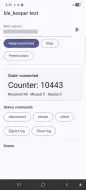
Testing with an ESP32 #
tools/esp32_test_device/ (in the GitHub repository) contains an Arduino
sketch that advertises as BLE-Test-Device, sends a uint32 counter every
second and accepts the commands disconnect, reboot and silent. The
example app connects to it, shows the counter, counts missed values and has
buttons for the commands.
- Flash the sketch (see its README).
- Run the example app, tap the scan icon, pick
BLE-Test-Device, tap Keep connected. - The counter increases every second; Missed shows values lost during disconnects (the device keeps counting while disconnected).
- Try the commands, Bluetooth off/on, walking out of range, killing the app. Export log shares the native event log.
No ESP32? tools/android_test_peripheral turns a spare Android phone into the
same test device. It advertises with a rotating private address, so bond the
central with it once: from an Android central pair in Settings > Bluetooth;
from an iPhone (no pairing screen for BLE peripherals) connect from the
example app, tap Bond in the peripheral app and accept the pairing
request (see the tool's README).
Testing iOS state restoration. Use a profile or release build started from
the home screen, not a debug build: since iOS 14 a debug Flutter app can only
be launched by the Flutter tool or Xcode, so iOS cannot relaunch it in the
background. For example flutter run --profile, press d to detach, then
open the app from the home screen. In debug and profile builds the example's
Simulate system kill button ends the process like a system termination;
iOS should relaunch the app on the next notification from the device.
Troubleshooting #
Connection drops when the screen is off on Xiaomi, Oppo, Vivo, Huawei, Samsung. These vendors stop foreground services that stock Android allows. Ask users to:
- Xiaomi (MIUI/HyperOS): Settings > Apps > your app > Autostart: on; Battery saver: No restrictions; lock the app in recents.
- Oppo / OnePlus / Realme (ColorOS): Settings > Battery > App battery management > your app: allow background activity and auto launch.
- Samsung (One UI): Settings > Battery > Background usage limits: remove the app from "Sleeping apps" and "Deep sleeping apps"; set the app's battery usage to "Unrestricted".
- Huawei (EMUI): Settings > Battery > App launch > your app: manage manually, allow all three options.
See dontkillmyapp.com for current per-vendor steps.
Status 133 on Android. A generic GATT error, frequent on some vendors. ble_keeper closes the connection and retries with exponential backoff (1 s up to 60 s). Persistent 133s usually mean the peripheral is out of range, already connected to another phone, or the phone's Bluetooth stack needs a toggle.
Android never connects to a new device. The first attempt is a direct
connection that times out after about 30 s; later attempts use
autoConnect, which only finds devices the phone has seen recently. Make
sure the device is advertising and in range for the first connection.
Stale services after a firmware update (Android). Android caches the GATT table for unbonded devices. Turn Bluetooth off and on to clear it.
iOS: Misconfigured: iOS does not know this peripheral. The identifier
does not belong to this app install. Scan for the device in your app first.
iOS: Connected together with Misconfigured: service ... not found. iOS
caches the GATT table of a bonded peripheral. If the peripheral removed a
service while connected and added it again (some peripherals do this on a
firmware restart), the cache can keep the table without it; reconnecting
does not refresh it. The peripheral must send Service Changed for the whole
handle range when its table changes (and keep handles stable). Users can
recover with Settings > Bluetooth > (i) > Forget This Device and pairing
again.
Limitations #
- iOS force-quit detection is a heuristic (see the table above).
- Android OEM battery managers can stop the service regardless.
- Writes are not queued across disconnects;
writefails withnot_connected. - Bonded / encrypted peripherals are not supported in 0.1: the plugin never
starts bonding itself, and a characteristic that requires encryption fails
its CCCD write (reported as
Blocked(Misconfigured); the OS may show a pairing prompt). Peripherals that use a random static address may need to be found again after Bluetooth is toggled. - No scanning, bonding API, GATT server or OTA.
- Payload integrity (CRC, sequence numbers) is your protocol's job.
Roadmap #
- Android
CompanionDeviceService(API 31+) so the system binds the app when an associated device comes in range. - iOS AccessorySetupKit (iOS 18+) for pairing and accessory-scoped permissions. Per Apple TN3115, from iOS 26 only apps that set up their accessories with AccessorySetupKit are relaunched after a user force-quit, a Control Center Bluetooth toggle or Airplane Mode; this is the main reason to add it.
- Connection priority and PHY options, bonding helpers.
FAQ #
Can I use it together with flutter_blue_plus or universal_ble? Yes, for scanning. Do not also connect to the same device with the other plugin: two connection owners in one app interfere (on Android two GATT clients, on iOS two central managers sharing one system connection).
Does it keep the app running? On Android the foreground service keeps the process alive. On iOS the app is suspended as usual; iOS keeps the connection and wakes the app for Bluetooth events.
Why do I get RestoredAfterKill on a normal iOS launch? iOS hands
preserved Bluetooth state back whenever the app starts after it was
terminated in the background; that is a restoration.
Why is deviceId a MAC address on Android and a UUID on iOS? Those are
what the platforms use. iOS never exposes MAC addresses.
Contributing #
See CONTRIBUTING.md. Report security issues as described in SECURITY.md.
License #
BSD 3-Clause. See LICENSE.
Metadata

Documentation
Publisher
unverified uploader
Weekly Downloads
Metadata
Keeps a BLE peripheral connected in the background, after the app is killed and after a reboot, on Android and iOS, and reports when the OS blocks it.
Repository (GitHub)
View/report issues
Contributing
Topics
#bluetooth #ble #background #iot
License
 BSD-3-Clause (license)
Dependencies
flutter, meta, plugin_platform_interface
More
Packages that depend on ble_keeper
Packages that implement ble_keeper