
chord_diagrams 0.7.0  chord_diagrams: ^0.7.0 copied to clipboard
 bandapps.de
Fast guitar and ukulele chord diagrams from simple chord labels.
chord_diagrams #
Guitar and ukulele chord diagrams for Flutter — just pass a chord name
like G, Em7, or Dsus4 and get a rendered diagram. Built-in renderer,
no external dependencies needed.
Features #
- 1000+ chord entries: 529 guitar and 547 ukulele, each with multiple voicings.
- Fast native C++ core for chord parsing, voicing selection, and SVG generation.
- Ready-to-use
ChordDiagramwidget with built-in SVG renderer. - Query available notes and suffixes for chord pickers.
- All platforms: Android, iOS, macOS, Windows, Linux, and Web.
Screenshots #
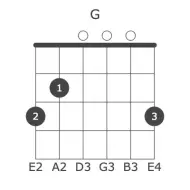
Guitar — G (4 voicings)


Ukulele — G (4 voicings)


Installation #
Add the package to your pubspec.yaml:
dependencies:
  chord_diagrams: ^0.7.0
Then install dependencies:
flutter pub get
Quick Start #
Call await ChordDiagrams.ensureInitialized() once before using the package.
On native platforms this is effectively instant. On web it loads the WASM
module.
If you just want to show a diagram in Flutter, use ChordDiagram. The SVG
rendering is already handled by this package.
import 'package:flutter/material.dart';
import 'package:chord_diagrams/chord_diagrams.dart';

Future<void> main() async {
  WidgetsFlutterBinding.ensureInitialized();
  await ChordDiagrams.ensureInitialized();

  runApp(const MaterialApp(
    home: Scaffold(
      body: Center(
        // Built-in renderer, no extra dependencies needed.
        // position: voicing index (0 = most common).
        // Use ChordDiagrams.getPositionCount('G') to get the total.
        child: ChordDiagram(
          chord: 'G',
          instrument: Instrument.guitar,
          position: 0,
          width: 300, // height is derived automatically
        ),
      ),
    ),
  ));
}
Build A Chord Picker #
Query the catalog to drive note and suffix selectors:
await ChordDiagrams.ensureInitialized();

final notes = ChordDiagrams.getNotes();
// ['C', 'C#', 'D', 'Eb', 'E', 'F', 'F#', 'G', 'Ab', 'A', 'Bb', 'B']

final suffixes = ChordDiagrams.getSuffixes('C');
// ['', 'm', '7', 'm7', 'maj7', '6', 'm6', 'sus2', ...]

final positions = ChordDiagrams.getPositionCount('Cmaj7');
// e.g. 4
position is a zero-based voicing index. 0 is usually the most common open
or low-fret shape; higher positions move up the neck.
Enharmonic equivalents resolve automatically. For example,
ChordDiagrams.guitar('Gb') returns the F# voicing while preserving "Gb" in
the rendered title.
Supported enharmonic pairs:
C#/Db, D#/Eb, F#/Gb, G#/Ab, A#/Bb.
Styling #
Customize colors and visibility globally. Changes apply to all subsequent calls.
await ChordDiagrams.ensureInitialized();

ChordDiagramsSettings.setBackgroundColor('#FFFFFF');
ChordDiagramsSettings.setGridColor('#444444');
ChordDiagramsSettings.setDotColor('#444444');
ChordDiagramsSettings.setDotStrokeColor('#444444');
ChordDiagramsSettings.setFingerTextColor('#FFFFFF');
ChordDiagramsSettings.setMutedColor('#444444');
ChordDiagramsSettings.setFretNumberColor('#444444');
ChordDiagramsSettings.setTuningColor('#444444');
ChordDiagramsSettings.setTitleColor('#444444');

ChordDiagramsSettings.setHideTitle(true);
ChordDiagramsSettings.setHideTuning(true);

ChordDiagramsSettings.reset();
Supported Chords #
Guitar: 529 chord entries using standard tuning E2-A2-D3-G3-B3-E4.
Ukulele: 547 chord entries using standard tuning G4-C4-E4-A4.
Supported suffixes include: major, minor, 7, m7, 6, m6, 9, m9, 11, 13, maj7, maj9, dim, dim7, aug, sus2, sus4, 7sus4, add9, m7b5, 7b5, 7b9, 7#9, alt, and slash chords.
Platforms #
Minimum requirements:
| Platform | Minimum |
|---|---|
| Android | API 24 |
| iOS | 12.0 |
| macOS | 10.15 |
| Windows | Windows 10 |
| Linux | x64, arm64 |
| Web | Modern browsers with WebAssembly |
Web uses WebAssembly. Native platforms use the bundled C++ implementation through FFI.
Demo App #
Run the example app:
cd example
flutter run -d chrome
Acknowledgements #
Based on chords-db and react-chords by David Rubert, MIT License.
Metadata

Documentation
Publisher
Weekly Downloads
Metadata
Fast guitar and ukulele chord diagrams from simple chord labels.
Repository (GitHub)
View/report issues
Topics
#guitar #chords #ukulele #music #diagram
License
 MIT (license)
Dependencies
ffi, flutter, flutter_web_plugins, wasm_ffi
More
Packages that depend on chord_diagrams
Packages that implement chord_diagrams