
control_core 0.9.4  control_core: ^0.9.4 copied to clipboard
 basecontrol.dev
Control Core is base library for flutter_control and other control modules.

Flutter Control is complex library to maintain App and State management.
Library merges multiple functionality under one hood. This approach helps to tidily bound separated logic into complex solution.
import 'package:control_core/core.dart';
Flutter Control Core
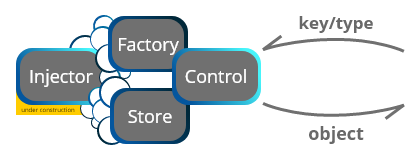
ControlMain static class. InitializesControlFactoryand provides easy access to most of core [Control] objects likeBaseLocalization,RouteStore,ControlBroadcast, etc..ControlFactoryInitializes and can store Controls, Models and other Objects. Works as Service Locator and Storage.
Factory has own Storage. Objects in this storage are accessible via custom key or Type. Best practice is to use Type as a key.
Factory is one and only Singleton in this Library.
Core objects of Flutter Control are stored in Factory's Storage by default (Control.initControl) and are accessible by theirTypeor via Providers.
    Control.initControl(
      entries: {
        CounterListControl: CounterListControl(),
      },
      initializers: {
        CounterModel: (_) => CounterModel(),
        CounterDetailControl: (args) => CounterDetailControl(model: Parse.getArg<CounterModel>(args)),
      },
      routes: [
        ControlRoute.build<DetailPage>(builder: (_) => DetailPage()),
      ],
      modules: [
        LocalinoModule(LocalinoConfig.empty),
      ],
      initAsync: () async {
        loadPreAppConfig();
      },
    );
-
ControlModelis base class to maintain Business Logic parts.
BaseControlis extended version of [ControlModel] with more functionality. Mainly used for robust Logic parts.
BaseModelis extended but lightweight version of [ControlModel]. Mainly used to control smaller logic parts.\ -
ControlObservableandControlSubscriptionare core underlying observable system and abstract base for other concrete robust implementations - mainly [ActionControl] and [FieldControl].
WithControlBuilderandControlBuilderGroupon the Widget side. These universal builder widgets can handle all possible types of Notifiers. -
ActionControlis one type of Observable used in this Library. It's quite lightweight and is used to notify Widgets and to provide events about value changes.
Has two variants - Single (just one listener), Broadcast (multiple listeners).
Upon dismiss of [ActionControl], everyControlSubscriptionis closed.
    final counter = ActionControl.broadcast<int>(0);

    counter.subscribe((value) => printDebug(value));

    void add() => counter.value++;
FieldControlis more robust Observable solution aroundStreamandStreamController. Primarily is used to notify Widgets and to provide events about value changes.
Can listenStream,Futureor subscribe to another [FieldControl] with possibility to filter and convert values.
[FieldControl] comes with pre-build primitive variants asStringControl,NumberControl, etc., where is possible to use validation, regex or value clamping. And alsoListControlto work with Iterables.
FieldSinkorFieldSinkConverterprovides Sink of [FieldControl].
Upon dismiss of [FieldControl], everyFieldSubscriptionis closed.
    final counter = FieldControl<int>(0);

    counter.subscribe((value) => printDebug(value));

    void add() => counter.value++;
Global Event System
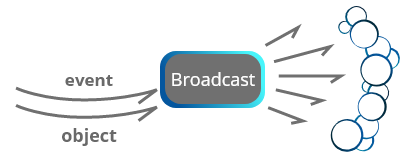
ControlBroadcastEvent stream across whole App. Default broadcaster is part ofControlFactoryand is stored there.
Every subscription is bound to it'skeyandTypeso notification to Listeners arrives only for expected data.
WithBroadcastProvideris possible to subscribe to any stream and send data or events from one end of App to the another, even to Widgets and their States. Also custom broadcaster can be created to separate events from global/default stream.
  BroadcastProvider.subscribe<int>('on_count_changed', (value) => updateCount(value));
  BraodcastProvider.broadcast('on_count_changed', 10);
Metadata
Publisher
Weekly Downloads
Metadata
Control Core is base library for flutter_control and other control modules.
Repository (GitHub)
View/report issues
License
 unknown (license)

