
crisp_chat 2.0.2  crisp_chat: ^2.0.2 copied to clipboard
A flutter plugin package for using crisp chat natively on Android & iOS.
Crisp Chat #
A flutter plugin package for using crisp chat natively on Android & iOS.

Chat with website visitors, integrate your favorite tools, and deliver a great customer experience. - Crisp. The Crisp Chat is a package that provides a simple way to open chat window using native channel. Connect with Crisp Chat, register a user to chat (or not) and render a chat widget. Tested on Android and iOS.
Note: If anyone want to contribute on this project is most welcome. If you have any idea or suggestion, please feel free to contact me.


Features #
- ✅ Null-safety enable
- ✅ Easy to use
- ✅ Customizable
- ✅ User configuration with company and geoLocation
- ✅ Supports for iOS & Android
Installation #
First, add crisp_chat as a dependency in your pubspec.yaml file.
To use the Flutter Crisp Chat, simply import the crisp_chat package:
Run this on your project terminal:
flutter pub add crisp_chat
or manually configure pubspec.yml file
dependencies:
  flutter:
    sdk: flutter
  crisp_chat: ^2.0.2
iOS #
Add two rows to the ios/Runner/Info.plist:
- key
Privacy - Camera Usage Descriptionand a usage description. - key
Privacy - Photo Library Additions Usage Descriptionand a usage description. - key
Privacy - Microphone Usage Descriptionand a usage description.
If editing Info.plist as text, add:
<key>NSCameraUsageDescription</key>
<string>your usage description here</string>
<key>NSPhotoLibraryAddUsageDescription</key>
<string>your usage description here</string>
<key>NSMicrophoneUsageDescription</key>
<string>your usage description here</string>
Android #
Add Internet permission on AndroidManifest.xml in your android/app/src/main/AndroidManifest.xml file.
<uses-permission android:name="android.permission.INTERNET"/>
Change the minimum Compile SDK version to 34 (or higher) in your android/app/build.gradle file.
compileSdkVersion 34
Change the minimum Android SDK version to 21 (or higher) in your android/app/build.gradle file.
minSdkVersion 21
Usage #
To open ChatView for crisp, use the openCrispChat method of the FlutterCrispChat class:
First Imported Package:
import 'package:crisp_chat/crisp_chat.dart';
Then:
 final String websiteID = 'YOUR_WEBSITE_KEY';
 late CrispConfig config;

   @override
  void initState() {
    super.initState();
    config = CrispConfig(
      websiteID: websiteID,
    );
  }
  @override
 Widget build(BuildContext context) {
   return MaterialApp(
     debugShowCheckedModeBanner: false,
     home: Scaffold(
       appBar: AppBar(
         title: const Text('Crisp Chat'),
       ),
       body: Center(
         child: Column(
           mainAxisAlignment: MainAxisAlignment.center,
           crossAxisAlignment: CrossAxisAlignment.center,
           children: [
             ElevatedButton(
               onPressed: () async {
                 await FlutterCrispChat.openCrispChat(config: config);
               },
               child: const Text('Open Crisp Chat'),
             ),
             const SizedBox(height: 20),
             ElevatedButton(
               onPressed: () async {
                 await FlutterCrispChat.resetCrispChatSession();
               },
               child: const Text('Reset Chat Session'),
             ),
           ],
         ),
       ),
     ),
   );
 }
To use this code, you will need to provide your own Crisp website ID. You can do this by replacing YOUR_WEBSITE_KEY with your own website ID. Once you have done this, you can run the app and press the "Open Crisp Chat" button to launch the chat window. You can add more information using CrispConfig.
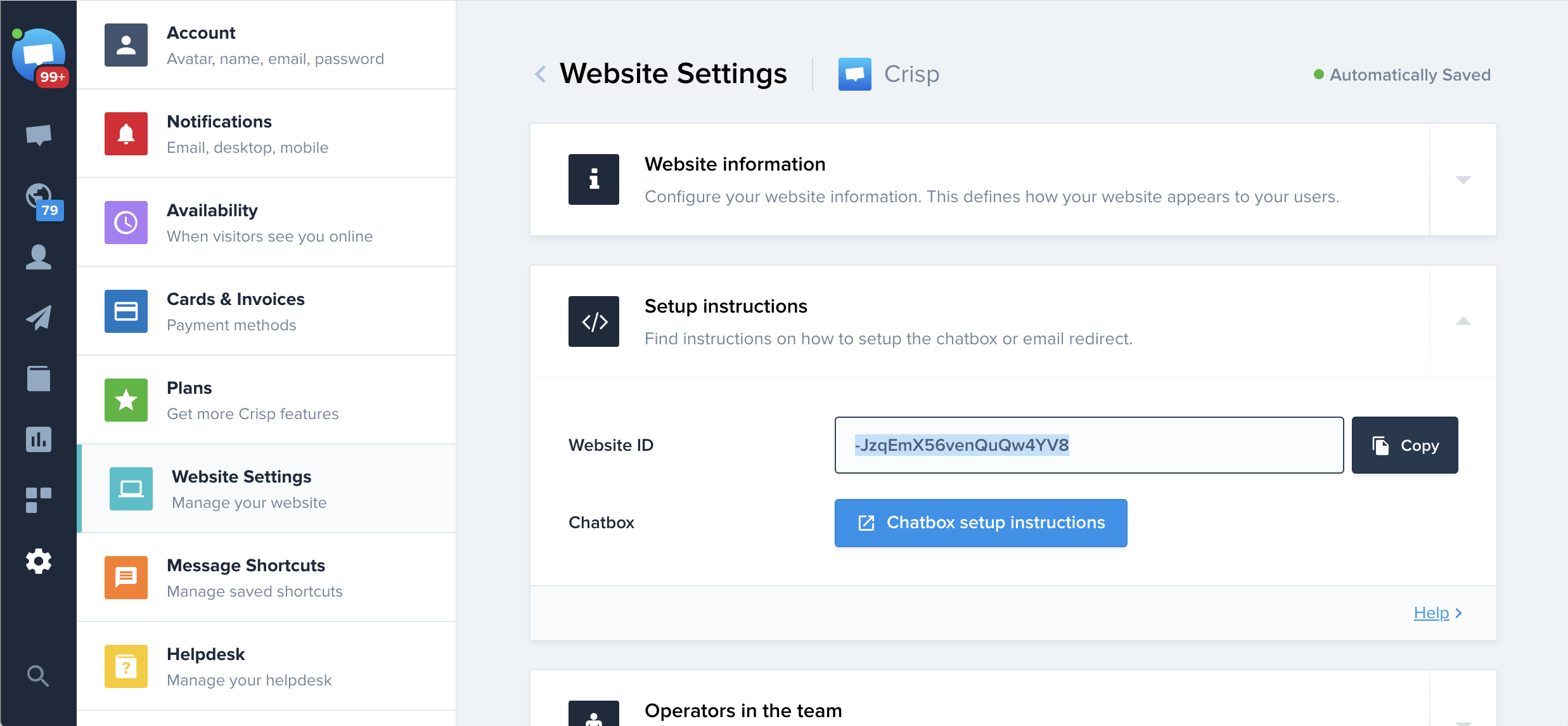
Get your Website ID: #
Go to your Crisp Dashboard, and copy your Website ID:
Screenshot (GIF) #
| Android (GIF) | iOS (GIF) |
|---|---|
 |
 |
| Android (Image) | iOS (Image) |
 |
 |
Additional information #
Project Maintainer ❤️
 Md. Al-Amin |
✨VALUABLE CONTRIBUTORS✨
Happy Coding 👨💻
Credits #
- Crisp Android and iOS SDK is owned and maintained by Crisp IM SAS.
You can chat with them on crisp or follow them on Twitter at Crisp_im.
License #
This project is licensed under the MIT License - see the LICENSE file for details.
Metadata
Publisher
unverified uploader
Weekly Downloads
Metadata
A flutter plugin package for using crisp chat natively on Android & iOS.
Repository (GitHub)
View/report issues
License
 unknown (license)
Dependencies
flutter, plugin_platform_interface
More
Packages that depend on crisp_chat
Packages that implement crisp_chat

