
esewa_flutter 3.0.0  esewa_flutter: ^3.0.0 copied to clipboard
 nabrajkhadka.com.np
An un-official Flutter plugin for eSewa Payment Gateway, integrate with ease and without any hassle.
eSewa Flutter 
 #
#


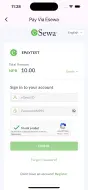
An un-official Flutter plugin for eSewa Payment Gateway. With this plugin, you can easily integrate eSewa Payment Gateway into your Flutter app and start accepting payments from your customers. Whether you're building an eCommerce app or any other type of app that requires payments, this plugin makes the integration process simple and straightforward.

What’s new (v2 form + signature) #
- Uses eSewa v2 form endpoint
- HMAC-SHA256 signature generated in Dart (no inline HTML)
- WebView posts
application/x-www-form-urlencoded - Success returns only base64
dataviaEsewaPaymentResponse
Installation #
Add the dependency in your app’s pubspec.yaml:
dependencies:
  esewa_flutter: latestVersion
This package depends on:
dependencies:
  flutter_inappwebview: ^6.1.5
  crypto: ^3.0.6
Run:
flutter pub get
iOS and Android setup #
- Ensure minimum Flutter 3 and a recent iOS/Android toolchain.
- iOS: WKWebView is used via
flutter_inappwebview. - Android: no extra setup beyond plugin requirements.
Quick start #
import 'package:esewa_flutter/esewa_flutter.dart';

// Inside a widget tree
EsewaPayButton(
  paymentConfig: ESewaConfig.dev(
    amount: 100.0,
    successUrl: 'https://developer.esewa.com.np/success',
    failureUrl: 'https://developer.esewa.com.np/failure',
    secretKey: 'YOUR_SECRET_KEY',
    // productCode: 'EPAYTEST', // optional for dev (defaults to EPAYTEST)
  ),
  onSuccess: (resp) {
    // resp.data is base64 string
    print('Success base64: ${resp.data}');
  },
  onFailure: (message) {
    print('Failed: $message');
  },
),
Or imperatively:
final result = await Esewa.i.init(
  context: context,
  eSewaConfig: ESewaConfig.live(
    amount: 100.0,
    successUrl: 'https://your.domain/success',
    failureUrl: 'https://your.domain/failure',
    secretKey: 'YOUR_SECRET_KEY',
    productCode: 'YOUR_MERCHANT_CODE',
  ),
);

if (result.hasData) {
  print(result.data!.data); // base64
} else {
  print(result.error);
}
With EsewaPayButton, the integration of eSewa Payment Gateway becomes even easier, as the payment
process can be initiated with just a single button press.
Properties #
The EsewaPayButton widget has the following parameters:
width: The width of the button (default isdouble.infinity).height: The height of the button (default is40.0).color: The background color of the button (default is the primary color of the app).borderColor: The border color of the button (default is the primary color of the app).onSuccess: The callback function that is called when the payment is successful.onFailure: The callback function that is called when the payment fails.paymentConfig: The eSewa payment configuration object that is required to initialize the payment screen.radius: The border radius of the button (default is4).widget: An optional widget to be placed instead of the title text field. If the user wants to place a row with the eSewa icon or different widget.title: The title of the button (default is "Pay with Esewa").textStyle: The text style of the button title.
Configuration #
Constructors align to environments and endpoints:
// Live
ESewaConfig.live({
  required double amount,
  double? taxAmount = 0,
  double? productServiceCharge = 0,
  double? productDeliveryCharge = 0,
  double? totalAmount, // optional; defaults to amount + tax + service + delivery
  String serverUrl = 'https://epay.esewa.com.np/api/epay/main/v2/form',
  required String productCode, // Merchant product code
  String? transactionUuid,     // Optional; auto-generated if not provided
  required String successUrl,  // Redirect URL on success
  required String failureUrl,  // Redirect URL on failure
  String signedFieldNames = 'total_amount,transaction_uuid,product_code',
  required String secretKey,   // HMAC-SHA256 secret key
})

// Dev/RC
ESewaConfig.dev({
  required double amount,
  double? taxAmount = 0,
  double? productServiceCharge = 0,
  double? productDeliveryCharge = 0,
  double? totalAmount,
  String serverUrl = 'https://rc-epay.esewa.com.np/api/epay/main/v2/form',
  String productCode = 'EPAYTEST',
  String? transactionUuid,
  required String successUrl,
  required String failureUrl,
  String signedFieldNames = 'total_amount,transaction_uuid,product_code',
  required String secretKey,
})
Field definitions #
- amount: base amount to charge
- taxAmount: tax amount
- productServiceCharge: service charge
- productDeliveryCharge: delivery charge
- totalAmount: if omitted, computed as amount + tax + service + delivery
- serverUrl: v2 form endpoint for the target environment
- productCode: eSewa merchant code (EPAYTEST in dev)
- transactionUuid: unique id; auto-generated if null
- successUrl, failureUrl: your redirect endpoints
- signedFieldNames: fields included in signature (default aligns with v2 spec)
- secretKey: HMAC secret key provided by eSewa
Return payload #
On success redirect, the plugin expects a data query parameter with a base64 string and returns:
EsewaPaymentResponse(data: '<base64>')
On failure redirect, the plugin returns an error message if message exists, otherwise a generic failure message.
How it works #
- Creates a POST form body with fields: amount, tax_amount, total_amount, product_service_charge, product_delivery_charge, transaction_uuid, product_code, success_url, failure_url, signed_field_names, signature.
- Signature is generated as HMAC-SHA256 over:
total_amount=<...>,transaction_uuid=<...>,product_code=<...>and base64-encoded. - Loads an
InAppWebViewand posts to the configured v2 endpoint. - Listens for navigation to your
successUrlorfailureUrland completes accordingly.
Troubleshooting #
- Ensure your
successUrlandfailureUrlare reachable and match exactly in config. - If you see "Couldn't resolve the package 'crypto'", run
flutter pub getin the plugin and your app. - If success occurs without
data, the plugin returns failure by design. Ensure your backend redirects with the base64dataquery param.
Dev Testing Information #
If you want to test eSewa payment integration in development environment, you can use the following information:
-
SecretKey: SecretKey for every merchant partner will be provided from eSewa For UAT, SecretKey will be
8gBm/:&EnhH.1/q(Input should be text type.) -
Algorithm used for signature generation is SHA-256
-
Test eSewa IDs: You can use any of the following test eSewa IDs for testing purposes:
- 9806800001
- 9806800002
- 9806800003
- 9806800004
- 9806800005
-
Password: Nepal@123
-
OTP: 123456
Run the example app #
- Navigate to the example folder
cd example - Install the dependencies
flutter pub get
- Set up configuration
ESewaConfig.live()or directly run with justESewaConfig.dev()in dev mode - Start the example
- Terminal :
flutter run
- Terminal :
License #
This plugin is released under the MIT License. See LICENSE for details.
Contributions #
Contributions are welcome! To make this project better, Feel free to open an issue or submit a pull request on Github..
Contact #
If you have any questions or suggestions, feel free to contact me on LinkedIn.
Metadata

Publisher
Weekly Downloads
Metadata
An un-official Flutter plugin for eSewa Payment Gateway, integrate with ease and without any hassle.
Repository (GitHub)
View/report issues
Documentation
License
 MIT (license)
Dependencies
crypto, flutter, flutter_inappwebview

