
file_launcher 0.1.0  file_launcher: ^0.1.0 copied to clipboard
 emloxtech.com
Open local files with native viewers on iOS and Android, with a share-sheet fallback and no storage permissions.

Give local files a natural next step. Open an invoice, listen to a recording, watch a clip or view a document using the device’s native UI—with a system share sheet when no viewer is available.
final result = await FileLauncher.open(file.path);
Get started · File types · Try the gallery · Results · Platform notes
Small API. Useful details. #
| 📄 Open naturally | 🎧 Bring your media | ↗ Keep a fallback |
|---|---|---|
| Quick Look inside your iOS app. Installed native viewers on Android. | PDF, audio, video, images, Office documents and more. | A system share sheet when a viewer cannot be found. |
| 🔐 No storage prompts | 📱 Built for mobile | ✓ Know the outcome |
|---|---|---|
| Share app-readable files using narrowly scoped, read-only Android URI grants. | Scene-aware iOS presentation and anchored iPad share popovers. | Clear result statuses. No waiting for the user to dismiss a viewer. |
Development preview · 0.1.0. Builds and automated checks are passing; the physical-device acceptance matrix is still pending. This is a native launcher: actual rendering and playback depend on the OS, installed viewer, file contents and codec.
Get started #
Add the package to your app:
dependencies:
  file_launcher: ^0.1.0
Import, open, and handle the result:
import 'package:file_launcher/file_launcher.dart';

final result = await FileLauncher.open(
  invoice.path,                 // Absolute path to a readable local file.
  title: 'Your invoice',        // Optional: iOS preview title.
);

if (!result.isSuccess) {
  // Show a message, retry later, or download the file again.
  debugPrint('${result.status.name}: ${result.message}');
}
Requirements: Flutter 3.44+, Dart 3.12+, Android API 24+. The iOS plugin declares iOS 13+; the example targets iOS 15 for Xcode 27. Older-iOS runtime verification is pending. CocoaPods and Swift Package Manager definitions are included; SPM has been build-verified. Web and desktop return unsupportedPlatform.
What can I open? #
Pass a file your app can already read. Common Android MIME types are mapped explicitly so filenames route consistently across OS versions. Other extensions use Android’s system lookup.
| File family | Example extensions | iOS | Android |
|---|---|---|---|
pdf |
Quick Look preview when supported | Installed PDF viewer | |
| Audio | mp3 m4a wav aac flac ogg opus |
Quick Look playback for supported formats/codecs | Installed audio player |
| Video | mp4 mov m4v webm mkv |
Quick Look playback for supported formats/codecs | Installed video player |
| Images | jpg png gif webp heic svg |
Quick Look when supported | Installed image viewer |
| Office | docx xlsx pptx doc xls ppt |
Quick Look when supported | Compatible document app |
| Text & data | txt csv json xml md rtf |
Quick Look when supported | Compatible text/data app |
| Other formats | zip epub vcf ics usdz |
Runtime Quick Look check, then share | Compatible app, then share |
| Unknown / custom | Any other extension | Preview if recognized; otherwise share | System type lookup, then generic launch/share |
When no viewer is available, the plugin tries the system share sheet. Listing an extension means it can be handed to the OS; it does not promise a decoder or installed app. A corrupt, password-protected or unsupported file can still be rejected by the viewer after launch. See Apple Quick Look and Android media formats for platform context; an external Android player may support different codecs. APK installation is intentionally unsupported.
Open a PDF #
await FileLauncher.open('/absolute/path/invoice.pdf', title: 'Invoice');
Open audio or video #
await FileLauncher.open('/absolute/path/recording.mp3');
await FileLauncher.open('/absolute/path/voice-note.m4a');
await FileLauncher.open('/absolute/path/clip.mp4');
The device supplies the player and playback controls. The returned result describes launching the viewer, not whether playback finished.
Downloaded a file without an extension? #
Prefer saving it with its real extension on both platforms. If that is not possible, supply an Android MIME override:
await FileLauncher.open(
  '/absolute/path/download',
  mimeType: 'application/pdf', // Android only.
);
Use a type/subtype, such as audio/mpeg or application/pdf. Surrounding whitespace and case are normalized on Android; malformed MIME overrides return error. On iOS the extension still matters, and mimeType is ignored.
Try the file gallery #
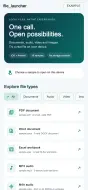
A small, categorized demo makes it easy to explore the native behavior yourself.

19 real bundled samples: PDF, DOCX, XLSX, seven audio formats, MP4, PNG, JPEG, TXT, CSV, JSON, ZIP, an unknown type and an extensionless PDF. Audio fixtures contain a three-second soft test tone.
cd example
flutter run
Choose Audio to try the players, or Other to explore the fallback. Each launch reports its status and elapsed time. Close the native screen before trying another sample. The image above shows the Flutter gallery; native viewer screens vary by device.
Know what happened #
FileLauncher.open() returns OpenFileResult instead of throwing.
| Result | What it means | Typical next step |
|---|---|---|
done |
iOS presented a preview, or Android accepted a viewer launch | Let the user continue |
shareSheet |
The system accepted a share-sheet launch | Let the user choose a destination |
fileNotFound |
The path is missing or is a directory | Download or locate the file again |
noAppToOpen |
Android could not launch a viewer or even a chooser | Suggest a compatible app |
noViewController |
iOS has no active screen to present on | Retry when the app is visible |
unsupportedPlatform |
This platform is not implemented | Hide or replace the open action |
error |
Invalid input, unreadable file, busy presentation or another failure | Inspect message |
isSuccess is true for done and shareSheet. Android may show an empty chooser if no receiving apps are installed; it cannot confirm that another app displayed the file. Neither success status means the user saved, read or played the file.
A few things to know #
- Local paths only. Copy picker/download results to an app-readable file. URLs,
content://strings, relative paths and directories are not file-path inputs. - Keep the real extension. Names such as
invoice.pdfandrecording.m4ahelp native viewers identify files correctly. - Open while foregrounded. Close the previous iOS preview before opening another. Calls during UI transitions can return an error to retry.
- Android stages a cache copy. Large files take time and disk space. Copies are retained for up to seven days until a later call cleans them; the OS may evict them earlier. Originals are not changed.
- No permission setup. The plugin declares no storage, installation or broad package-query permissions, and needs no iOS Info.plist keys.
Read the platform and cache details →
Moving from another opener? #
// Before: OpenFile.open(path) or OpenFilex.open(path)
final result = await FileLauncher.open(path);
if (result.isSuccess) {
  // A viewer or share sheet was launched.
}
Use mimeType for Android type overrides and result.status for failure handling. Remove old provider overrides only if nothing else uses them. Migration and platform details →
Validation & contributing #
The repo includes Dart tests, example tests, native Android routing tests, an iOS test target, and CI build checks. The Android tests verify PDF/audio MIME routing, URI read grants and share fallback; they do not substitute for seeing and hearing files on real devices.
See TESTING.md for the acceptance matrix and recorded local results. Run flutter analyze and flutter test from the package, then flutter test from example. Release requires physical-device checks, repository metadata and publication review.
MIT licensed. Built with Flutter, Android intents and Apple Quick Look.
Metadata

Documentation
Publisher
Weekly Downloads
Metadata
Open local files with native viewers on iOS and Android, with a share-sheet fallback and no storage permissions.
Repository (GitHub)
View/report issues
Topics
#file #open-file #viewer #pdf #quick-look
License
 MIT (license)
Dependencies
flutter, plugin_platform_interface
More
Packages that depend on file_launcher
Packages that implement file_launcher