
flutter_time_guard 1.2.2  flutter_time_guard: ^1.2.2 copied to clipboard
 m-yahia2011.space
A Flutter plugin for detecting system Date/Time and Time zone changes and validate device time against NTP, ensuring reliable and secure time-sensitive operations.






🛡 Flutter Time Guard 🛡 #
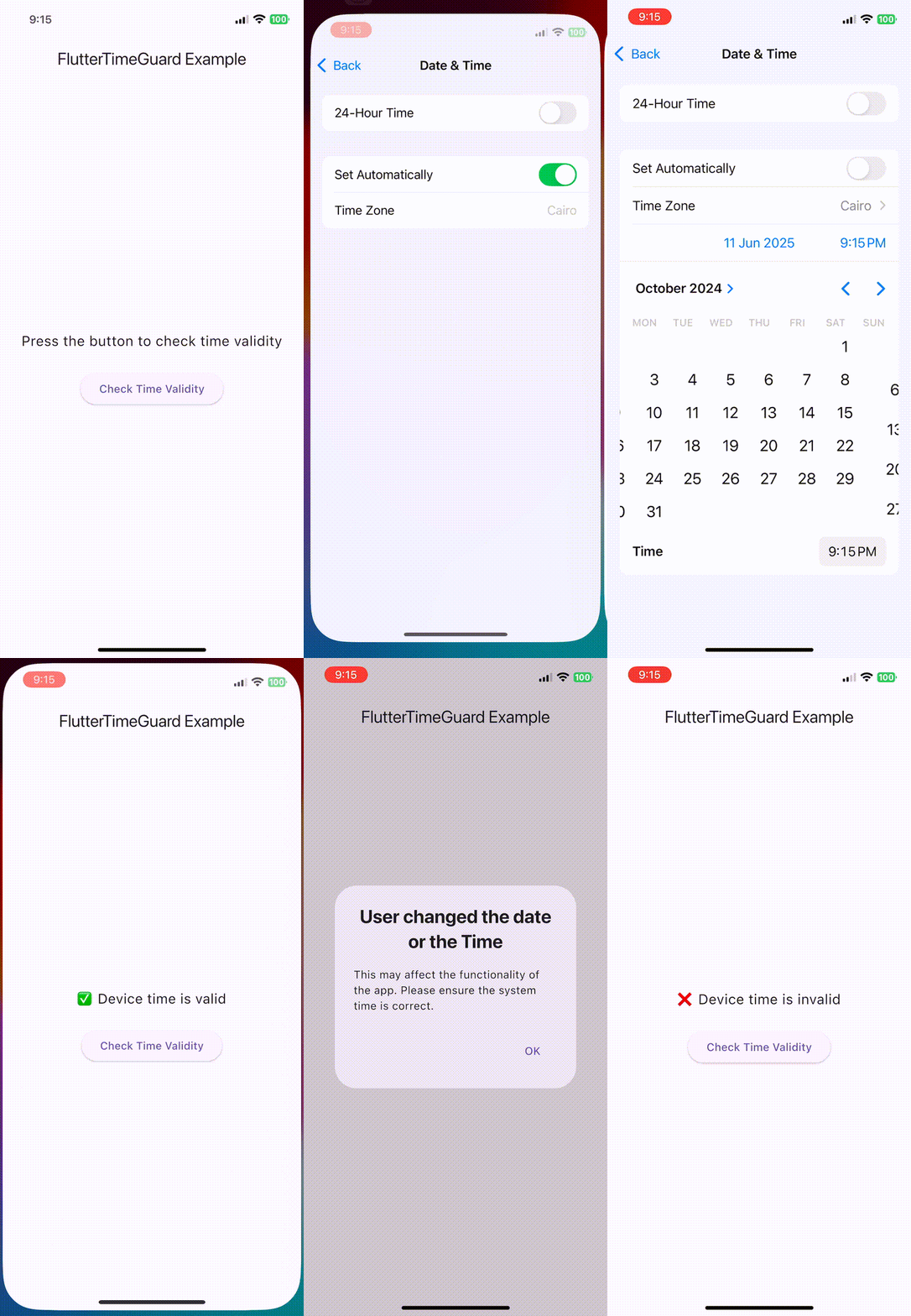
A Flutter plugin to detect system Date/Time and Time zone changes and validate device time against NTP (Network Time Protocol).
Ideal for time-sensitive applications like authentication, licenses, time tracking, and fraud prevention.
✨ Features #
- ⏰ Detect manual changes to the device's date or time.
- 🌐 Validate device time against reliable NTP servers with customizable tolerance for time deviation.
🔧 Installation #
flutter pub add flutter_time_guard
🚀 Usage #
⚠️ Important #
isDateTimeValidreuses the most recent cached network timestamp when an NTP lookup fails.- If no cached value exists (first launch or cleared storage), it returns
trueso the app remains usable; add your own guard if you need to fail closed.
1. Validate System Time #
import 'package:flutter_time_guard/flutter_time_guard.dart';

FlutterTimeGuard.configureLogging(enableLogs: true); // optional verbose logging

// assign a reasonable tolerance value (defaults to 86400 seconds / 24 hours)
final isValid = await FlutterTimeGuard.isDateTimeValid(toleranceInSeconds: 86400);
print('Is time valid? $isValid');
2. Listen to Manual Date/Time and Time zone Changes #
FlutterTimeGuard.listenToDateTimeChange(
 onTimeChanged: () {
    // Show a warning dialog or alert user
    print('User manually changed the system time.');
  },
  stopListeingAfterFirstChange:true, // stop listening after first change
);
3. Validate Within the Listener to Filter False Positives #
Use this pattern when the app is in the background and the OS adjusts the clock automatically (for example: the system does an NTP sync or daylight-saving change). The listener still fires, so re-validating against NTP before alerting the user suppresses those false positives and only flags real manual tampering.
import 'package:flutter/material.dart';
import 'package:flutter_time_guard/flutter_time_guard.dart';

// Register this navigatorKey inside your MaterialApp to access context globally.
final navigatorKey = GlobalKey<NavigatorState>();

FlutterTimeGuard.listenToDateTimeChange(
  stopListeingAfterFirstChange: true,
  onTimeChanged: () async {
    FlutterTimeGuard.log('Time changed');

    // Skip alerts when the automatic time sync keeps the device within tolerance.
    final isValidTime = await FlutterTimeGuard.isDateTimeValid(
      toleranceInSeconds: 86400, // default tolerance is 86400 seconds (24 hours)
    );
    if (isValidTime) return;

    final context = navigatorKey.currentContext;
    if (context == null) return;

    await showDialog<void>(
      context: context,
      barrierDismissible: false,
      builder: (context) => AlertDialog(
        title: const Text('Invalid Device Time'),
        content: const Text(
          'Your device clock looks incorrect. Please adjust it to continue.',
        ),
        actions: [
          TextButton(
            onPressed: () => Navigator.of(context).pop(),
            child: const Text('OK'),
          ),
        ],
      ),
    );
  },
);
💡 Example #
import 'package:flutter/material.dart';
import 'package:flutter_time_guard/flutter_time_guard.dart';

void main() {
  runApp(const MyApp());
}

class MyApp extends StatelessWidget {
  const MyApp({super.key});

  @override
  Widget build(BuildContext context) {
    return const MaterialApp(home: TimeGuardDemoPage());
  }
}

class TimeGuardDemoPage extends StatefulWidget {
  const TimeGuardDemoPage({super.key});

  @override
  State<TimeGuardDemoPage> createState() => _TimeGuardDemoPageState();
}

class _TimeGuardDemoPageState extends State<TimeGuardDemoPage> {
  bool? _isValid;
  bool _isLoading = false;

  Future<void> _checkTimeValidity() async {
    setState(() => _isLoading = true);
    final result = await FlutterTimeGuard.isDateTimeValid();
    setState(() {
      _isValid = result;
      _isLoading = false;
    });
  }

  String _getMessage() {
    if (_isValid == null) return 'Press the button to check time validity';
    return _isValid! ? '✅ Device time is valid' : '❌ Device time is invalid';
  }

  @override
  void initState() {
    super.initState();
    WidgetsBinding.instance.addPostFrameCallback((_) {
      FlutterTimeGuard.listenToDateTimeChange(
        onTimeChanged: () {
          showAdaptiveDialog(
            context: context,
            builder: (context) => AlertDialog(
              title: const Text(
                'User changed the date or the Time',
                textAlign: TextAlign.center,
                style: TextStyle(fontWeight: FontWeight.bold),
              ),
              content: const Text(
                'This may affect the functionality of the app. Please ensure the system time is correct.',
              ),
              actions: [
                TextButton(
                  onPressed: () => Navigator.of(context).pop(),
                  child: const Text('OK'),
                ),
              ],
            ),
          );
        },
        stopListeingAfterFirstChange: true,
      );
    });
  }

  @override
  Widget build(BuildContext context) {
    return Scaffold(
      appBar: AppBar(
        title: const Text('FlutterTimeGuard Example'),
        centerTitle: true,
      ),
      body: Center(
        child: Padding(
          padding: const EdgeInsets.all(24.0),
          child: Column(
            mainAxisAlignment: MainAxisAlignment.center,
            children: [
              Text(
                _getMessage(),
                style: const TextStyle(fontSize: 18),
                textAlign: TextAlign.center,
              ),
              const SizedBox(height: 24),
              _isLoading
                  ? const CircularProgressIndicator()
                  : ElevatedButton(
                      onPressed: _checkTimeValidity,
                      child: const Text('Check Time Validity'),
                    ),
            ],
          ),
        ),
      ),
    );
  }
}
🧪 TODO #
- Provide more configuration options
🙌 Contributions #
Contributions are welcome! Please feel free to submit issues or pull requests.
🔄 Recent Changes #
- Added shields.io badges for package status, licensing, and open issues.
- Mentioned optional logging configuration in the README.
- Added an advanced usage example for re-validating time inside the listener to avoid false positives while the app is backgrounded.
📬 Contact #
Metadata
Publisher
Weekly Downloads
Metadata
A Flutter plugin for detecting system Date/Time and Time zone changes and validate device time against NTP, ensuring reliable and secure time-sensitive operations.
Homepage
Repository (GitHub)
View/report issues
Topics
#time #ntp #datetime #security
Documentation
License
 unknown (license)
Dependencies
flutter, flutter_secure_storage, ntp, plugin_platform_interface
More
Packages that depend on flutter_time_guard
Packages that implement flutter_time_guard

