
ipados_menu_bar 0.0.3  ipados_menu_bar: ^0.0.3 copied to clipboard
 sorolla.studio
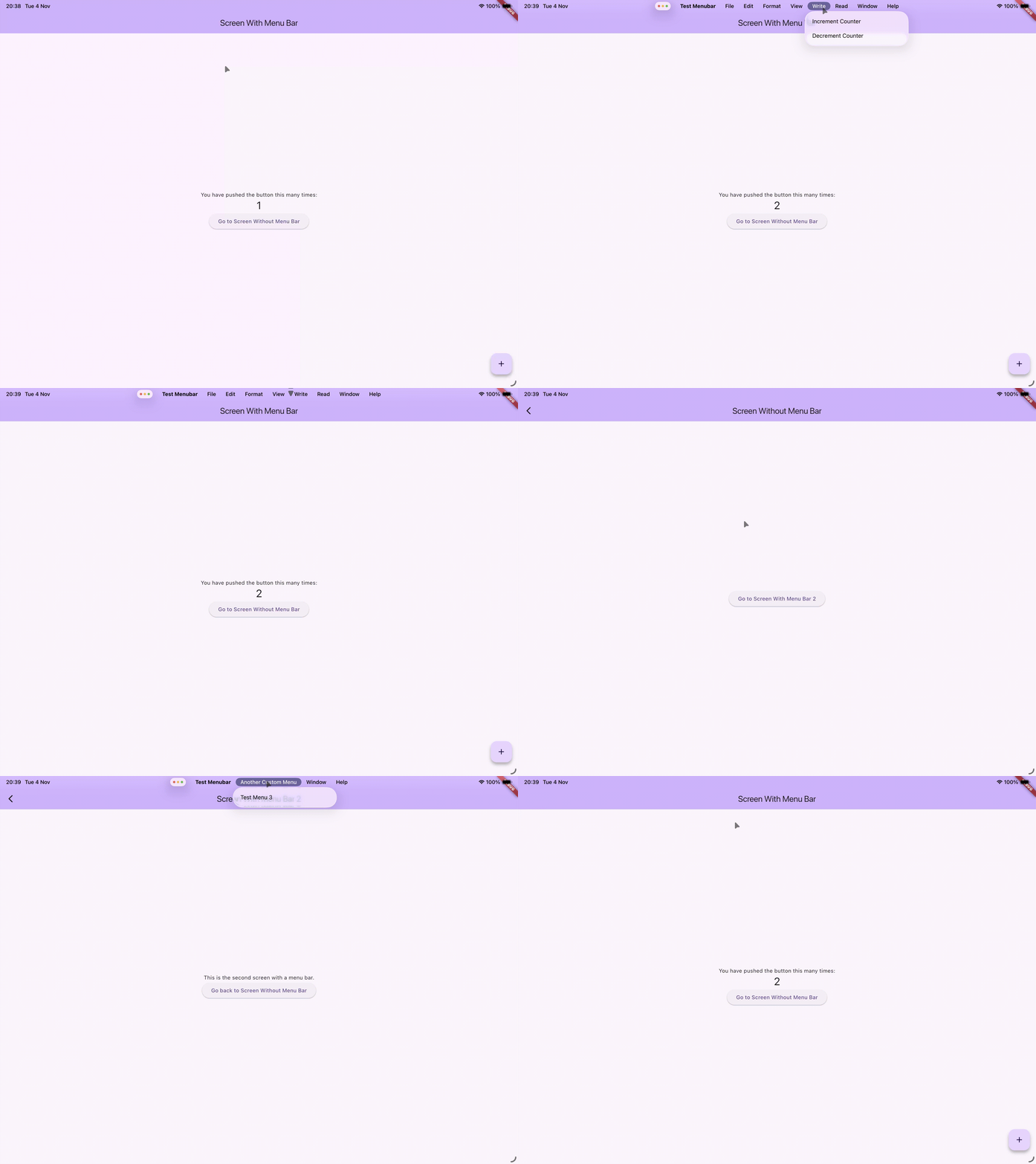
A Flutter package that brings the iPadOS menubar to your apps, offering a native-like, customizable menu experience for iPad.
🍎 iPadOS Menu Bar 📱

A custom PlatformMenuDelegate that adds iPadOS 26+ menu bar functionality to Flutter apps
📑 Table of Contents #
- 🧭 Human Interface Guidelines
- 🚀 Features
- 📦 Installation
- 🏁 Getting Started
- 🎛️ Customization Options
- 📱 Platform Support
- 🔧 Feature Roadmap
- ⚠️ API Stability Notice
- 🤝 Contributing
- 📄 License
🧭 Human Interface Guidelines #
This package follows Apple’s official Human Interface Guidelines for the iPadOS menu bar. Before designing your menus, review these resources to ensure consistency with the system experience:
- WWDC session on the iPadOS menu bar: https://developer.apple.com/videos/play/wwdc2025/208/?time=624
- Apple HIG – Menu Bar: https://developer.apple.com/design/human-interface-guidelines/the-menu-bar
🚀 Features #
Bring the native iPadOS menu bar experience to your Flutter applications with this custom PlatformMenuDelegate. This package provides seamless integration with iPadOS 26+ menu bar functionality, allowing users to access app features through the system menu bar.
📦 Installation #
Add ipados_menu_bar to your pubspec.yaml:
dependencies:
  ipados_menu_bar: ^0.0.3
Then run:
flutter pub get
🏁 Getting Started #
Basic Setup #
Initialize the iPadOS menu bar in your app's main() method:
import 'package:flutter/material.dart';
import 'package:ipados_menu_bar/ipados_menu_bar.dart';

void main() {
  WidgetsFlutterBinding.ensureInitialized();
  WidgetsBinding.instance.platformMenuDelegate = IpadOSPlatformMenuDelegate();

  runApp(MyApp());
}

class MyApp extends StatelessWidget {
  @override
  Widget build(BuildContext context) {
    return MaterialApp(
      title: 'iPadOS Menu Bar Demo',
      home: PlatformMenuBar(
        menus: [
          // Your custom menus here
          PlatformMenu(
            label: 'Actions',
            menus: [
              PlatformMenuItemGroup(
                members: [
                  PlatformMenuItem(
                    label: 'New Document',
                    onSelected: () {
                      // Handle action
                    },
                  ),
                  PlatformMenuItem(
                    label: 'Open Document',
                    onSelected: () {
                      // Handle action
                    },
                  ),
                ],
              ),
            ],
          ),
        ],
        child: Scaffold(
          appBar: AppBar(
            title: Text('My App'),
          ),
          body: Center(
            child: Text('Hello iPadOS Menu Bar!'),
          ),
        ),
      ),
    );
  }
}
Advanced Configuration #
You can customize default menu items behavior using the configureDefaultMenus method:
// Get instance of the Menu Delegate
_menuDelegate = WidgetsBinding.instance.platformMenuDelegate as IpadOSPlatformMenuDelegate;

// Hide default menus
await _menuDelegate.configureDefaultMenus({
    'hidden': ['format', 'edit'],
});

// Add custom items to the default iOS menu items
await _menuDelegate.configureDefaultMenus({
    'file': {
        'additionalItems': [
          {'id': 100, 'label': 'New Special File', 'enabled': true},
          {'id': 101, 'label': 'Open Special File', 'enabled': true},
        ],
    },
});
🎛️ Customization Options #
Hidden Default Menus #
The package allows you to hide default system menu items that come with iPadOS:
- File: Hide file-related actions
- Edit: Hide editing actions (cut, copy, paste, etc.)
- Format: Hide text formatting options
- View: Hide view-related controls
You can customize default menu items behavior using the configureDefaultMenus method:
// Get instance of the Menu Delegate
_menuDelegate = WidgetsBinding.instance.platformMenuDelegate as IpadOSPlatformMenuDelegate;

// Hide default menus
await _menuDelegate.configureDefaultMenus({
    'hidden': ['format', 'edit'],
});

// Add custom items to the default iOS menu items
await _menuDelegate.configureDefaultMenus({
    'file': {
        'additionalItems': [
          {'id': 100, 'label': 'New Special File', 'enabled': true},
          {'id': 101, 'label': 'Open Special File', 'enabled': true},
        ],
    },
});
Disable Menu Items #
On custom menu items, you can disable menu items by setting the onSelected or onSelectedIntent a null value:
// Controlling when an item should be clickable using a boolean
PlatformMenuItem(
  label: 'Item 0 (Enabled: $enabledBoolean)',
  onSelected: enabledBoolean
      ? () => debugPrint("Item 0 selected")
      : null,
),
This is handful when changing contexts, like opening a modal.
Menu Structure #
Create organized menu hierarchies with:
PlatformMenu: Top-level menu categoriesPlatformMenuItemGroup: Grouped menu items with separatorsPlatformMenuItem: Individual menu actions with optional keyboard shortcuts
📱 Platform Support #
This package is specifically designed for iPadOS 26+ and provides enhanced functionality when running on compatible devices. On older iOS versions, it gracefully falls back to standard Flutter menu behavior.
🔧 Feature Roadmap #
| Feature | Status |
|---|---|
| Basic Menu Bar Integration | ✅ |
| Custom Menu Items | ✅ |
| Custom Menu Items HIG Placement | ✅ |
| Hide Default Menus (File, Edit, Format, View) | ✅ |
| Submenu Nesting | ✅ |
| Dynamic Menu Updates | ✅ |
| Menu Separators | ✅ |
| App Info Custom Children Items | ❌ |
| Menu Icons Support | ❌ |
| Default Items Callbacks via Dart | ❌ |
⚠️ API Stability Notice #
Important: This package is currently in early development (version 0.x.x). The API is subject to breaking changes until it reaches a stable 1.0.0 release. Please be aware that:
- Method signatures may change
- Configuration options may be modified or removed
- New features may introduce breaking changes
We recommend pinning to a specific version in your pubspec.yaml and reviewing the changelog before updating. Once the package reaches version 1.0.0, we will follow semantic versioning for all future releases.
🤝 Contributing #
Contributions are welcome! Please feel free to submit a Pull Request. For major changes, please open an issue first to discuss what you would like to change.
📄 License #
This package is licensed under MIT License.
Metadata
Publisher
Weekly Downloads
Metadata
A Flutter package that brings the iPadOS menubar to your apps, offering a native-like, customizable menu experience for iPad.
Repository (GitHub)
View/report issues
License
 unknown (license)
Dependencies
flutter, plugin_platform_interface
More
Packages that depend on ipados_menu_bar
Packages that implement ipados_menu_bar

