
qrscan 1.2.4  qrscan: ^1.2.4 copied to clipboard
One-shot Flutter QR/barcode scanner: open camera, first decode, string back. Android CameraX+ZXing, iOS Vision. Not a widget.
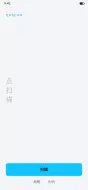
import 'package:flutter/material.dart';
import 'package:flutter/services.dart';
import 'package:qrscan/qrscan.dart' as scanner;

import 'scan_button.dart';
import 'scan_handle.dart';

void main() {
  runApp(const DemoApp());
}

class DemoApp extends StatelessWidget {
  const DemoApp({super.key});

  @override
  Widget build(BuildContext context) {
    return MaterialApp(
      debugShowCheckedModeBanner: false,
      theme: ThemeData(
        useMaterial3: true,
        colorScheme: ColorScheme.fromSeed(
          seedColor: const Color(0xFF07C160),
          brightness: Brightness.light,
        ),
      ),
      home: const DemoPage(),
    );
  }
}

class DemoPage extends StatefulWidget {
  const DemoPage({super.key});

  @override
  State<DemoPage> createState() => _DemoPageState();
}

class _DemoPageState extends State<DemoPage> {
  ScanHandled? _hit;
  Uint8List? _png;
  scanner.ScanLooks _looks = scanner.ScanLooks.wechat;

  String get _label =>
      _looks == scanner.ScanLooks.alipay ? '扫码' : '扫一扫';

  void _apply(String code) {
    setState(() {
      _png = null;
      _hit = handleScan(code);
    });
  }

  Future<void> _photo() async {
    final String? code = await scanner.scanPhoto();
    if (!mounted || code == null) return;
    _apply(code);
  }

  Future<void> _make() async {
    final Uint8List png = await scanner.generateBarCode(
      _hit?.raw ?? 'https://github.com/wu9007/qrcode_scanner',
    );
    if (!mounted) return;
    setState(() => _png = png);
  }

  @override
  Widget build(BuildContext context) {
    final ColorScheme cs = Theme.of(context).colorScheme;
    return Scaffold(
      backgroundColor: cs.surface,
      body: SafeArea(
        child: Padding(
          padding: const EdgeInsets.fromLTRB(24, 28, 24, 16),
          child: Column(
            crossAxisAlignment: CrossAxisAlignment.stretch,
            children: <Widget>[
              Text(
                'qrscan',
                style: Theme.of(context).textTheme.labelLarge?.copyWith(
                      letterSpacing: 1.4,
                      color: _looks.color,
                    ),
              ),
              const SizedBox(height: 28),
              Expanded(
                child: _png != null
                    ? Center(child: Image.memory(_png!, width: 180, height: 180))
                    : _hit == null
                        ? Center(
                            child: Text(
                              _looks.hint ?? '点扫描',
                              textAlign: TextAlign.center,
                              style: Theme.of(context).textTheme.titleMedium
                                  ?.copyWith(
                                    color: cs.onSurface.withValues(alpha: 0.45),
                                  ),
                            ),
                          )
                        : _HitView(hit: _hit!),
              ),
              Wrap(
                spacing: 8,
                children: <Widget>[
                  _LooksChip(
                    label: '微信',
                    color: scanner.ScanLooks.wechat.color,
                    selected: _looks == scanner.ScanLooks.wechat,
                    onTap: () => setState(
                      () => _looks = scanner.ScanLooks.wechat,
                    ),
                  ),
                  _LooksChip(
                    label: '支付宝',
                    color: scanner.ScanLooks.alipay.color,
                    selected: _looks == scanner.ScanLooks.alipay,
                    onTap: () => setState(
                      () => _looks = scanner.ScanLooks.alipay,
                    ),
                  ),
                ],
              ),
              const SizedBox(height: 12),
              ScanButton(
                looks: _looks,
                label: _label,
                onCode: _apply,
              ),
              const SizedBox(height: 8),
              Row(
                mainAxisAlignment: MainAxisAlignment.center,
                children: <Widget>[
                  TextButton(onPressed: _photo, child: const Text('相册')),
                  TextButton(onPressed: _make, child: const Text('生码')),
                ],
              ),
            ],
          ),
        ),
      ),
    );
  }
}

class _HitView extends StatelessWidget {
  const _HitView({required this.hit});
  final ScanHandled hit;

  @override
  Widget build(BuildContext context) {
    return ListView(
      children: <Widget>[
        Text(hit.label, style: Theme.of(context).textTheme.labelLarge),
        const SizedBox(height: 8),
        Text(hit.raw, style: Theme.of(context).textTheme.titleMedium),
        const SizedBox(height: 16),
        for (final ScanField f in hit.fields)
          Padding(
            padding: const EdgeInsets.only(bottom: 8),
            child: Row(
              crossAxisAlignment: CrossAxisAlignment.start,
              children: <Widget>[
                SizedBox(
                  width: 64,
                  child: Text(f.k, style: Theme.of(context).textTheme.bodySmall),
                ),
                Expanded(child: Text(f.v, style: Theme.of(context).textTheme.bodyMedium)),
              ],
            ),
          ),
      ],
    );
  }
}

class _LooksChip extends StatelessWidget {
  const _LooksChip({
    required this.label,
    required this.color,
    required this.selected,
    required this.onTap,
  });

  final String label;
  final Color color;
  final bool selected;
  final VoidCallback onTap;

  @override
  Widget build(BuildContext context) {
    return FilterChip(
      label: Text(label),
      selected: selected,
      onSelected: (_) => onTap(),
      selectedColor: color.withValues(alpha: 0.22),
      checkmarkColor: color,
      side: BorderSide(color: color),
    );
  }
}Metadata
391
likes
140
points
325
downloads

Documentation
Publisher
unverified uploader
Weekly Downloads
Metadata
One-shot Flutter QR/barcode scanner: open camera, first decode, string back. Android CameraX+ZXing, iOS Vision. Not a widget.
Homepage
Repository (GitHub)
View/report issues
Topics
#qr #barcode #qr-code #camera #scanner
License
 MIT (license)
Dependencies
More
Packages that depend on qrscan
Packages that implement qrscan