
scrollview_observer 1.14.0  scrollview_observer: ^1.14.0 copied to clipboard
 fullstackaction.com
A widget for observing data related to the child widgets being displayed in a scrollview.
Flutter ScrollView Observer #



Language: English | 中文
This is a library of widget that can be used to listen for child widgets those are being displayed in the scroll view.
Support me ☕ #


Chat: Join WeChat group
Article #
- Flutter - 获取ListView当前正在显示的Widget信息 | 备用链接
- Flutter - 列表滚动定位超强辅助库,墙裂推荐!🔥 | 备用链接
- Flutter - 快速实现聊天会话列表的效果,完美💯 | 备用链接
- Flutter - 船新升级😱支持观察第三方构建的滚动视图💪 | 备用链接
Feature #
You do not need to change the view you are currently using, just wrap a
ViewObserveraround the view to achieve the following features.
- ✅ Observing child widgets those are being displayed in the scroll view
- ✅ Supports scrolling to the specified index position
- ✅ Quickly implement the chat session page effect
Support #
- ✅
ListView - ✅
SliverList - ✅
GridView - ✅
SliverGrid - ✅ Mixing usage of
SliverPersistentHeader,SliverListandSliverGrid - ✅
ScrollViewbuilt by third-party package.
Installing #
Add scrollview_observer to your pubspec.yaml file:
dependencies:
  scrollview_observer: latest_version
Import scrollview_observer in files that it will be used:
import 'package:scrollview_observer/scrollview_observer.dart';
Getting Started #
Take
ListViewas an example
1、Observing child widgets those are being displayed in the scroll view #
Parameter description of ListViewObserver:
Parameter |
Required |
Description |
|---|---|---|
child |
yes |
Create [ListView] as a child of [ListViewObserver] |
sliverListContexts |
no |
In this callback, we need to return all [BuildContext] of the [ListView] those needs to be observed. This property is only used when [BuildContext] needs to be specified exactly |
onObserve |
no |
This callback can listen for information about the child widgets those are currently being displayed in the current first [Sliver] |
onObserveAll |
no |
This callback can listen for information about all the children of slivers that are currently being displayed. This callback is only needed when there are more than one [Sliver] |
leadingOffset |
no |
The offset of the head of scroll view. Find the first child start at this offset. |
dynamicLeadingOffset |
no |
This is a callback that provides [leadingOffset], used when the leading offset in the head of the scroll view is dynamic. It has a higher priority than [leadingOffset] |
toNextOverPercent |
no |
When the percentage of the first child widget is blocked reaches this value, the next child widget will be the first child that is displaying. The default value is 1 |
autoTriggerObserveTypes |
no |
Used to set types those can trigger observe automatically |
triggerOnObserveType |
no |
Used to set the prerequisite for triggering [onObserve] callback and [onObserveAll] callback |
Method 1: General (Recommended)
It is relatively simple to use and has a wide application range. In general, only this method is needed
Build ListViewObserver and pass the ListView instance to the child parameter
ListViewObserver(
  child: _buildListView(),
  onObserve: (resultModel) {
    print('firstChild.index -- ${resultModel.firstChild?.index}');
    print('displaying -- ${resultModel.displayingChildIndexList}');
  },
)
By default, ListView relevant data will only be observed when scrolling.
If needed, you can use ListObserverController triggered an observation manually.
// Create an instance of [ListObserverController]
ListObserverController controller = ListObserverController();
...

// Pass the controller instance to the 'controller' parameter of 'ListViewObserver'
ListViewObserver(
  ...
  controller: controller,
  ...
)
...

// Trigger an observation manually.
controller.dispatchOnceObserve();
Method 2: Specify BuildContext for Sliver
Relatively complex to use, the scope of application is small, there are more than one
Sliveris possible to use this method
Detailed instructions
BuildContext? _sliverListViewContext;
Create a ListView and record BuildContext in its builder callback
ListView _buildListView() {
  return ListView.separated(
    itemBuilder: (ctx, index) {
      if (_sliverListViewContext != ctx) {
        _sliverListViewContext = ctx;
      }
      ...
    },
    ...
  );
}
Create ListViewObserver
ListViewObserver(
  child: _buildListView(),
  sliverListContexts: () {
    return [if (_sliverListViewContext != null) _sliverListViewContext!];
  },
  onObserve: (resultMap) {
    final model = resultMap[_sliverListViewContext];
    if (model == null) return;

    // Prints the first child widget index that is currently being displayed
    print('firstChild.index -- ${model.firstChild?.index}');

    // Prints the index of all child widgets those are currently being displayed
    print('displaying -- ${model.displayingChildIndexList}');
  },
)
By default, ListView relevant data will only be observed when scrolling.
If needed, you can use ListViewOnceObserveNotification triggered an observation manually.
ListViewOnceObserveNotification().dispatch(_sliverListViewContext);
1.1、Parameter autoTriggerObserveTypes
Used to set types those can trigger observe automatically, defined as follows:
final List<ObserverAutoTriggerObserveType>? autoTriggerObserveTypes;
enum ObserverAutoTriggerObserveType {
  scrollStart,
  scrollUpdate,
  scrollEnd,
}
Defaults to [.scrollStart, .scrollUpdate, .scrollEnd].
Description of enum values as follow:
| value | Desc |
|---|---|
scrollStart |
when a [Scrollable] widget has started scrolling. |
scrollUpdate |
when a [Scrollable] widget has changed its scroll position. |
scrollEnd |
when a [Scrollable] widget has stopped scrolling. |
1.2、Parameter triggerOnObserveType
Used to set the prerequisite for triggering [onObserve] callback and [onObserveAll] callback, defined as follows:
final ObserverTriggerOnObserveType triggerOnObserveType;
enum ObserverTriggerOnObserveType {
  directly,
  displayingItemsChange,
}
Defaults to .displayingItemsChange.
Description of enum values as follow:
| value | Desc |
|---|---|
directly |
The callback onObserve will be called directly when getting observed result for scrollView. |
displayingItemsChange |
The callback onObserve will be called when child widget comes in and out or when the number of child widget changes. |
1.3、Callback onObserveViewport
Only
CustomScrollViewis supported.
Used to observe which specified slivers are being displayed in the Viewport of CustomScrollView.
SliverViewObserver(
  child: _buildScrollView(),
  sliverContexts: () {
    return [
      if (grid1Context != null) grid1Context!,
      if (swipeContext != null) swipeContext!,
      if (grid2Context != null) grid2Context!,
    ];
  },
  onObserveViewport: (result) {
    firstChildCtxInViewport = result.firstChild.sliverContext;
    if (firstChildCtxInViewport == grid1Context) {
      debugPrint('current first sliver in viewport - gridView1');
    } else if (firstChildCtxInViewport == swipeContext) {
      debugPrint('current first sliver in viewport - swipeView');
    } else if (firstChildCtxInViewport == grid2Context) {
      debugPrint('current first sliver in viewport - gridView2');
    }
  },
)
1.4、Callback customTargetRenderSliverType
Only
ListViewObserverandGridViewObserverare supported.
While maintaining the original observation logic, tell the package the RenderSliver to be observed, in order to support the observation of the list built by the third-party package.
customTargetRenderSliverType: (renderObj) {
  // Here you tell the package what type of RenderObject it needs to observe.
  return renderObj is ExtendedRenderSliverList;
},
1.5、Callback customHandleObserve
This callback is used to customize the observation logic and is used when the built-in observation logic does not meet your needs.
customHandleObserve: (context) {
  // Here you can customize the observation logic.
  final _obj = ObserverUtils.findRenderObject(context);
  if (_obj is RenderSliverList) {
    ObserverCore.handleListObserve(context: context);
  }
  if (_obj is RenderSliverGrid || _obj is RenderSliverWaterfallFlow) {
    return ObserverCore.handleGridObserve(context: context);
  }
  return null;
},
1.6、Callback extendedHandleObserve
Only
SliverViewObserveris supported.
This callback is used to supplement the original observation logic, which originally only dealt with RenderSliverList, RenderSliverFixedExtentList and RenderSliverGrid.
extendedHandleObserve: (context) {
  // An extension of the original observation logic.
  final _obj = ObserverUtils.findRenderObject(context);
  if (_obj is RenderSliverWaterfallFlow) {
    return ObserverCore.handleGridObserve(context: context);
  }
  return null;
},
2、Scrolling to the specified index location #
It should be used with the scrollView's cacheExtent property. Assigning an appropriate value to it can avoid unnecessary page turning.
The recommendations are as follows:
- If child widgets are fixed height in scrollView, use
isFixedHeightinstead ofcacheExtent. - For scrollView such as detail page, it is recommended to set
cacheExtenttodouble.maxFinite. - If child widgets are dynamic height in scrollView, it is recommended that setting
cacheExtentto a large and reasonable value depending on your situation.
2.1、Basic usage
Create and use instance of ScrollController normally.
ScrollController scrollController = ScrollController();

ListView _buildListView() {
  return ListView.separated(
    controller: scrollController,
    ...
  );
}
Create an instance of ListObserverController pass it to ListViewObserver
ListObserverController observerController = ListObserverController(controller: scrollController);

ListViewObserver(
  controller: observerController,
  child: _buildListView(),
  ...
)
Now you can scroll to the specified index position
// Jump to the specified index position without animation.
observerController.jumpTo(index: 1)

// Jump to the specified index position with animation.
observerController.animateTo(
  index: 1,
  duration: const Duration(milliseconds: 250),
  curve: Curves.ease,
);
2.2、Parameter padding
If your ListView or GridView uses its padding parameter, you need to sync that value as well! Such as:
ListView.separated(padding: _padding, ...);
GridView.builder(padding: _padding, ...);
observerController.jumpTo(index: 1, padding: _padding);
⚠ Do not use SliverPadding in CustomScrollView.
2.3、Parameter isFixedHeight
If the height of a list child widget is fixed, it is recommended to use the 'isFixedHeight' parameter to improve performance.
⚠ Currently only ListView or SliverList is supported.
// Jump to the specified index position without animation.
observerController.jumpTo(index: 150, isFixedHeight: true)

// Jump to the specified index position with animation.
observerController.animateTo(
  index: 150,
  isFixedHeight: true
  duration: const Duration(milliseconds: 250),
  curve: Curves.ease,
);
If you use CustomScrollView and its slivers contain SliverList and SliverGrid, this is also supported, but you need to use SliverViewObserver, and pass the corresponding BuildContext to distinguish the corresponding Sliver when calling the scroll method.
SliverViewObserver(
  controller: observerController,
  child: CustomScrollView(
    controller: scrollController,
    slivers: [
      _buildSliverListView1(),
      _buildSliverListView2(),
    ],
  ),
  sliverListContexts: () {
    return [
      if (_sliverViewCtx1 != null) _sliverViewCtx1!,
      if (_sliverViewCtx2 != null) _sliverViewCtx2!,
    ];
  },
  ...
)
observerController.animateTo(
  sliverContext: _sliverViewCtx2, // _sliverViewCtx1
  index: 10,
  duration: const Duration(milliseconds: 300),
  curve: Curves.easeInOut,
);
2.4、Parameter offset
Used to set the whole scrollView offset when scrolling to a specified index.
For example, in the scene with SliverAppBar, its height will change with the scrolling of ScrollView. After reaching a certain offset, it will be suspended on the top with a fixed height, and then we must pass this fixed height to the offset parameter.
SliverAppBar(
  key: appBarKey,
  pinned: true,
  expandedHeight: 200,
  flexibleSpace: FlexibleSpaceBar(
    title: const Text('AppBar'),
    background: Container(color: Colors.orange),
  ),
);
observerController.animateTo(
  ...
  offset: (offset) {
    // The height of the SliverAppBar is calculated base on target offset and is returned in the current callback.
    // The observerController internally adjusts the appropriate offset based on the return value.
    return ObserverUtils.calcPersistentHeaderExtent(
      key: appBarKey,
      offset: offset,
    );
  },
);
2.5、Parameter alignment
The alignment specifies the desired position for the leading edge of the child widget. It must be a value in the range [0.0, 1.0]. Such as:
alignment: 0: Scrolling to thetopposition of the child widget.alignment: 0.5: Scrolling to themiddleposition of the child widget.alignment: 1: Scrolling to thetailposition of the child widget.
2.6、Property cacheJumpIndexOffset
For performance reasons, ScrollController will caches the child's information by default when the listView jump or animate to the specified location, so that it can be used next time directly.
However, in scence where the height of child widget is always changing dynamically, this will cause unnecessary trouble, so you can turn this off by setting the cacheJumpIndexOffset property to false.
2.7、Method clearIndexOffsetCache
You can use the clearIndexOffsetCache method if you want to preserve the cache function of scrolling and only want to clear the cache in certain cases.
/// Clear the offset cache that jumping to a specified index location.
clearIndexOffsetCache(BuildContext? sliverContext) {
  ...
}
The parameter sliverContext needs to be passed only if you manage ScrollView's BuildContext by yourself.
2.8、Initial index location
- Method 1:
initialIndex
The simplest way to use, directly set the location index.
observerController = ListObserverController(controller: scrollController)
  ..initialIndex = 10;
- Method 2:
initialIndexModel
You can customize the configuration of the initial index position. See the end of this section for property descriptions.
observerController = ListObserverController(controller: scrollController)
  ..initialIndexModel = ObserverIndexPositionModel(
    index: 10,
    isFixedHeight = true,
    alignment = 0.5,
  );
- Method 3:
initialIndexModelBlock
You need return ObserverIndexPositionModel object within the callback.
This method applies to some of scenarios those the parameters can't be determined from the start, such as sliverContext.
observerController = SliverObserverController(controller: scrollController)
  ..initialIndexModelBlock = () {
    return ObserverIndexPositionModel(
      index: 6,
      sliverContext: _sliverListCtx,
      offset: calcPersistentHeaderExtent,
    );
  };
The structure of ObserverIndexPositionModel :
ObserverIndexPositionModel({
  required this.index,
  this.sliverContext,
  this.isFixedHeight = false,
  this.alignment = 0,
  this.offset,
  this.padding = EdgeInsets.zero,
});
| Property | Type | Desc |
|---|---|---|
index |
int |
The index of child widget. |
sliverContext |
BuildContext |
The target sliver [BuildContext]. |
isFixedHeight |
bool |
If the height of the child widget and the height of the separator are fixed, please pass true to this property. Defaults to false |
alignment |
double |
The alignment specifies the desired position for the leading edge of the child widget. It must be a value in the range [0.0, 1.0]. Defaults to 1.0 |
offset |
double Function(double targetOffset) |
Use this property when locating position needs an offset. |
padding |
EdgeInsets |
If your ListView or GridView uses its padding parameter, you need to sync that value as well! Otherwise it is not required. |
3、Chat Observer #
3.1、Basic usage
We only need three steps to implement the chat session page effect.
- 1、All chat data are displayed at the top of the listView when there is less than one screen of chat data.
- 2、When inserting a chat data
- If the latest message is close to the bottom of the list, the listView will be pushed up.
- Otherwise, the listView will be fixed to the current chat position.
Step 1: Initialize the necessary ListObserverController and ChatScrollObserver.
/// Initialize ListObserverController
observerController = ListObserverController(controller: scrollController)
  ..cacheJumpIndexOffset = false;

/// Initialize ChatScrollObserver
chatObserver = ChatScrollObserver(observerController)
  // Greater than this offset will be fixed to the current chat position.
  ..fixedPositionOffset = 5
  ..toRebuildScrollViewCallback = () {
    // Here you can use other way to rebuild the specified listView instead of [setState]
    setState(() {});
  };
Step 2: Configure ListView as follows and wrap it with ListViewObserver.
Widget _buildListView() {
  Widget resultWidget = ListView.builder(
    physics: ChatObserverClampingScrollPhysics(observer: chatObserver),
    shrinkWrap: chatObserver.isShrinkWrap,
    reverse: true,
    controller: scrollController,
    ...
  );

  resultWidget = ListViewObserver(
    controller: observerController,
    child: resultWidget,
  );
  return resultWidget;
}
Step 3: Call the [standby] method of ChatScrollObserver before inserting or removing chat data.
onPressed: () {
  chatObserver.standby();
  setState(() {
    chatModels.insert(0, ChatDataHelper.createChatModel());
  });
},
...
onRemove: () {
  chatObserver.standby(isRemove: true);
  setState(() {
    chatModels.removeAt(index);
  });
},
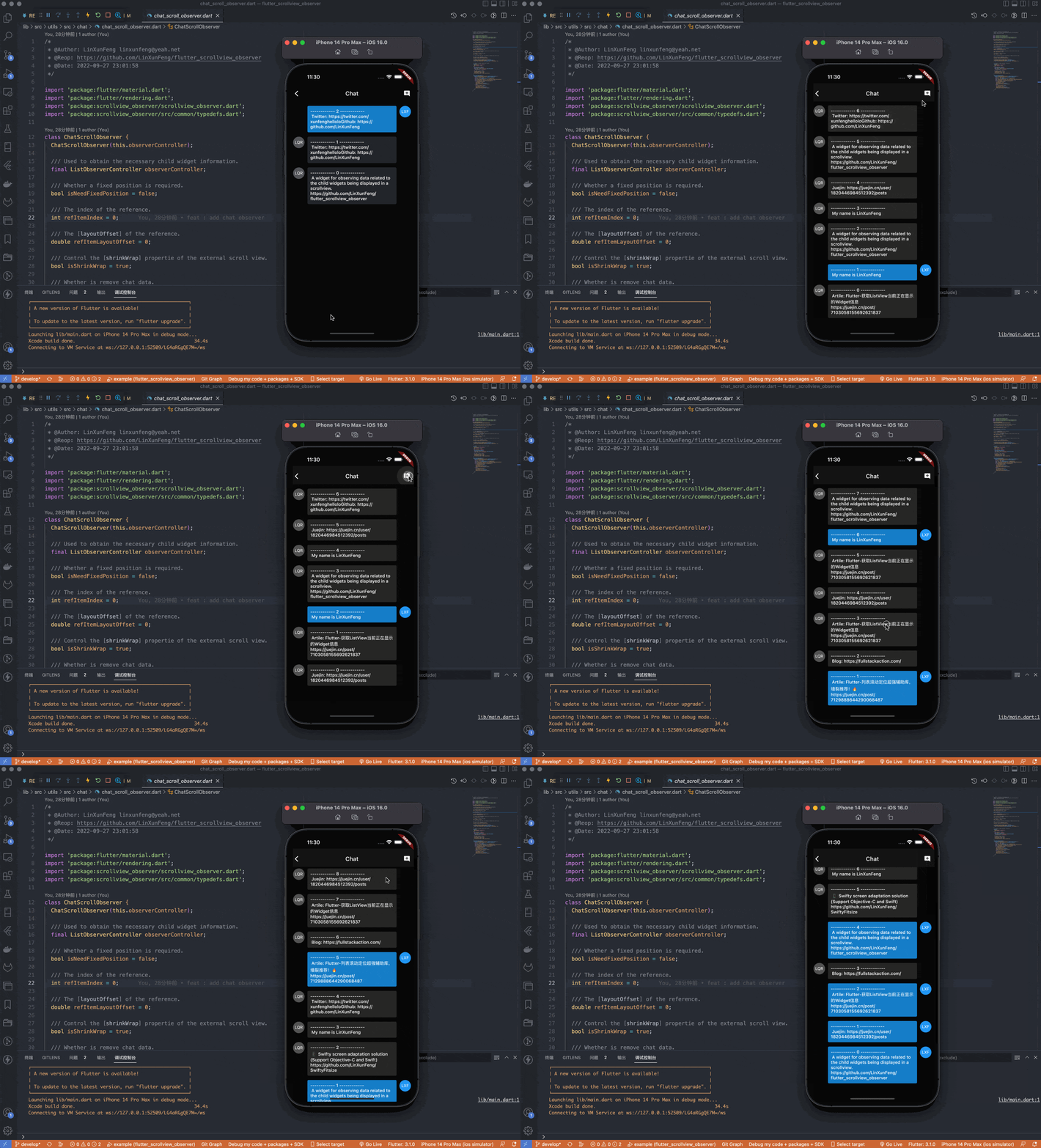
This feature only handles inserting one message by default. If you need to insert multiple messages at once, you can pass the changeCount parameter to the standby method.
_addMessage(int count) {
  chatObserver.standby(changeCount: count);
  setState(() {
    needIncrementUnreadMsgCount = true;
    for (var i = 0; i < count; i++) {
      chatModels.insert(0, ChatDataHelper.createChatModel());
    }
  });
}
Note: This feature relies on the latest message view before the message is inserted as a reference to calculate the offset, so if too many messages are inserted at once and the reference message view cannot be rendered, this feature will fail, and you need to try to avoid this problem by setting a reasonable value for cacheExtent of ScrollView by yourself!
3.2、The result callback for processing chat position.
chatObserver = ChatScrollObserver(observerController)
  ..onHandlePositionResultCallback = (result) {
    switch (result.type) {
      case ChatScrollObserverHandlePositionType.keepPosition:
        // Keep the current chat position.
        // updateUnreadMsgCount(changeCount: result.changeCount);
        break;
      case ChatScrollObserverHandlePositionType.none:
        // Do nothing about the chat position.
        // updateUnreadMsgCount(isReset: true);
        break;
    }
  };
This callback is mainly used to display the unread bubbles of new messages when adding chat messages.
3.3、Generative message keeps position
The generative messages like ChatGPT also need to keep the message position when looking through old messages, you only need to adjust the processing mode in the standby method.
chatObserver.standby(
  mode: ChatScrollObserverHandleMode.generative,
  // changeCount: 1,
);
Note: The referenced item will be determined internally based on changeCount, and this mode only supports the case where generative messages are continuous.
3.4、Specifies the referenced item
If your generative messages are discontinuous, or there are generative message updates and the behavior of adding and deleting messages at the same time, in this complex case, you need to specify the referenced item by yourself, and This processing mode is more flexible.
chatObserver.standby(
  changeCount: 1,
  mode: ChatScrollObserverHandleMode.specified,
  refItemRelativeIndex: 2,
  refItemRelativeIndexAfterUpdate: 2,
);
- Set
modeto.specified. - Set
refItemRelativeIndexto relative index of the referenceditembefore the update. - Set
refItemRelativeIndexAfterUpdateto relative index of the referenceditemafter the update.
Note: The relativeIndex refers to the relative index of the item being displayed on screen, as shown below
     trailing        relativeIndex
-----------------  -----------------
|     item4     |          4
|     item3     |          3
|     item2     |          2
|     item1     |          1
|     item0     |          0
-----------------  -----------------
     leading
     trailing        relativeIndex
-----------------  -----------------
|     item14    |          4
|     item13    |          3
|     item12    |          2
|     item11    |          1
|     item10    |          0
-----------------  -----------------
     leading
Remember, your refItemRelativeIndex and refItemRelativeIndexAfterUpdate should point to the same message object whatever you set!
4、Model Property #
ObserveModel
The base class of the observing data.
| Property | Type | Desc |
|---|---|---|
sliver |
RenderSliver |
The target sliver. |
visible |
bool |
Whether this sliver should be painted. |
displayingChildIndexList |
List<int> |
Stores index list for children widgets those are displaying. |
axis |
Axis |
The axis of sliver. |
scrollOffset |
double |
The scroll offset of sliver. |
ListViewObserveModel
A special observing models which inherits from the
ObserveModelforListViewandSliverList.
| Property | Type | Desc |
|---|---|---|
sliver |
RenderSliverMultiBoxAdaptor |
The target sliverList. |
firstChild |
ListViewObserveDisplayingChildModel |
The observing data of the first child widget that is displaying. |
displayingChildModelList |
List<ListViewObserveDisplayingChildModel> |
Stores observing model list of displaying children widgets. |
GridViewObserveModel
A special observing models which inherits from the
ObserveModelforGridViewandSliverGrid.
| Property | Type | Desc |
|---|---|---|
sliverGrid |
RenderSliverGrid |
The target sliverGrid. |
firstGroupChildList |
List<GridViewObserveDisplayingChildModel> |
The observing datas of first group displaying child widgets. |
displayingChildModelList |
List<GridViewObserveDisplayingChildModel> |
Stores observing model list of displaying children widgets. |
ObserveDisplayingChildModel
Data information about the child widget that is currently being displayed.
| Property | Type | Desc |
|---|---|---|
sliver |
RenderSliver |
The target sliverList. |
index |
int |
The index of child widget. |
renderObject |
RenderBox |
The renderObject [RenderBox] of child widget. |
ObserveDisplayingChildModelMixin
The currently displayed child widgets data information, is for
ObserveDisplayingChildModelsupplement.
| Property | Type | Desc |
|---|---|---|
axis |
Axis |
The axis of sliver. |
size |
Size |
The size of child widget. |
mainAxisSize |
double |
The size of child widget on the main axis. |
scrollOffset |
double |
The scroll offset of sliver. |
layoutOffset |
double |
The layout offset of child widget. |
leadingMarginToViewport |
double |
The margin from the top of the child widget to the viewport. |
trailingMarginToViewport |
double |
The margin from the bottom of the child widget to the viewport. |
displayPercentage |
double |
The display percentage of the current widget. |
Example #
1、ListView / SliverList #


2、GridView / SliverGrid #


3、CustomScrollView #

4、Scene #


About Me #
- GitHub: https://github.com/LinXunFeng
- Email: [email protected]
- Blogs:

Metadata
Publisher
Weekly Downloads
Metadata
A widget for observing data related to the child widgets being displayed in a scrollview.
Repository (GitHub)
View/report issues
License
 unknown (license)

