
tracelet 1.6.0  tracelet: ^1.6.0 copied to clipboard
 ikolvi.com
Production-grade background geolocation for Flutter. Battery-conscious tracking, geofencing, SQLite persistence, HTTP sync, and headless execution for iOS & Android.

Tracelet #


Production-grade background geolocation for Flutter — fully open-source.
Battery-conscious motion-detection intelligence, geofencing, SQLite persistence, HTTP sync, and headless Dart execution for iOS & Android.
Features #
- Background location tracking — continuous GPS with configurable
distanceFilteranddesiredAccuracy - Motion-detection intelligence — accelerometer + activity recognition automatically toggle GPS to save battery
- Geofencing — circular and polygon geofences with enter/exit/dwell events. Unlimited geofences via proximity-based auto-load/unload
- SQLite persistence — all locations stored locally, queryable, with configurable retention limits
- HTTP auto-sync — batch upload with retry, exponential backoff, offline queue, Wi-Fi-only option
- Headless execution — run Dart code in response to background events
- Scheduling — time-based tracking windows (e.g., "Mon–Fri 9am–5pm") with optional AlarmManager (Android)
- Start on boot — resume after device reboot
- Dart-controlled permissions — no native dialogs, full Dart-side customization
- Foreground service toggle — run with or without a persistent notification (Android)
- Debug sounds — audible feedback during development
- Elasticity control — speed-based distance filter scaling with disable/multiplier overrides
- Location filtering — reject GPS spikes, low-accuracy readings, and speed jumps via
LocationFilter - Kalman filter — optional GPS coordinate smoothing via Extended Kalman Filter (
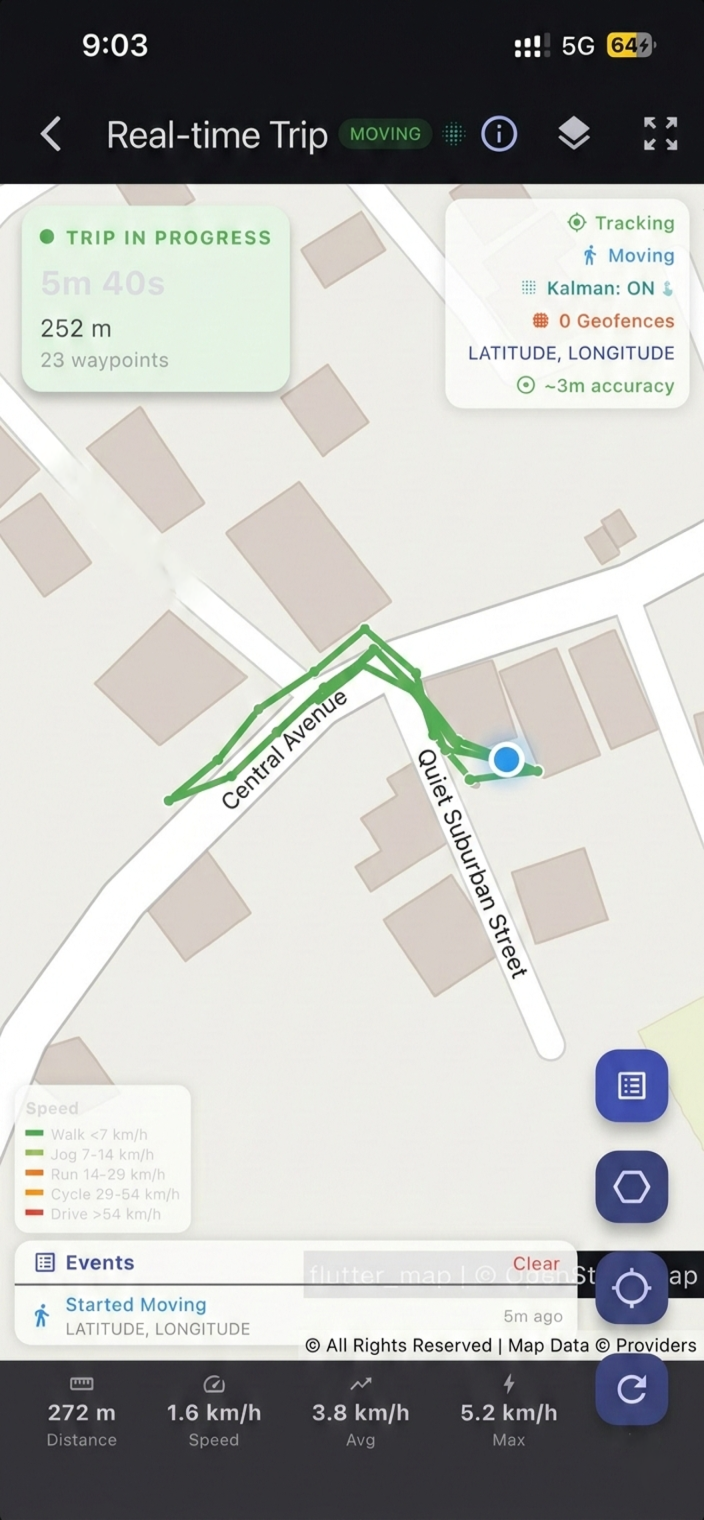
useKalmanFilter: true) - Trip detection — automatic trip start/stop events with distance, duration, and waypoints
- Polygon geofences — define geofences with arbitrary polygon vertices for non-circular regions
- Auto-stop — automatically stop tracking after N minutes via
stopAfterElapsedMinutes - Activity recognition tuning — confidence thresholds, stop-detection delays, stationary behavior
- Timestamp metadata — optional extra timing fields on each location record
- Geofence high-accuracy mode — full GPS pipeline in geofence-only mode (Android)
- Prevent suspend (iOS) — silent audio keep-alive for continuous background execution
- Unlimited geofences — monitor thousands of geofences despite platform limits (100 Android / 20 iOS). Only the closest geofences within
geofenceProximityRadiusare registered with the OS. As the device moves, geofences are automatically swapped in/out, withonGeofencesChangeevents for each activation/deactivation. - Shared Dart algorithms — location filtering, geofence proximity, schedule parsing, and persistence logic run in shared Dart for cross-platform consistency
- Battery budget engine — adaptive feedback control adjusts
distanceFilter,desiredAccuracy, and periodic interval to maintain a configurablebatteryBudgetPerHourtarget (1.0–5.0 %/hr). Subscribe viaonBudgetAdjustment(). - Carbon footprint estimator — per-trip and cumulative CO₂ calculator using EU EEA 2024 emission factors (gCO₂/km) per transport mode. Returns
TripCarbonSummarywith breakdown by mode. - Delta encoding — 60–80% HTTP batch payload reduction via delta compression. Dart + Kotlin + Swift implementations for native encoding during sync.
- R-tree spatial index — O(log n) geofence queries supporting 10,000+ geofences with sub-ms lookup.
queryCircle()andqueryBBox()APIs. - GDPR/CCPA compliance reports —
generateComplianceReport()returns structured data processing inventory (JSON & Markdown export). - Sparse updates — app-level deduplication drops locations within
sparseDistanceThresholdof last recorded position. - Dead reckoning — inertial navigation (accel + gyro + compass) when GPS lost, with configurable activation delay and max duration.
- Wi-Fi-only sync —
disableAutoSyncOnCellulardefers HTTP sync to Wi-Fi connections. - Periodic mode — configurable one-shot fixes (60 sec–12 hrs), with Android foreground service and exact alarm support.
- Mock location detection — detect and reject spoofed GPS with configurable detection levels (basic platform flags + advanced heuristics). Learn more →
- OEM compatibility — automatic mitigations for aggressive OEM power management (Huawei, Xiaomi, OnePlus, Samsung, Oppo, Vivo) with Settings Health API. Learn more →
- iOS background hardening — all critical native operations wrapped in
beginBackgroundTask, with iOS 17+CLBackgroundActivitySessionand iOS 18+CLServiceSessionfor extended background runtime. Learn more → - Adaptive sampling — auto-adjusts
distanceFilterbased on detected activity, battery level, and speed for optimal battery/accuracy trade-off. Learn more → - Health check API —
getHealth()returns a comprehensive diagnostic snapshot covering permissions, battery, sensors, database, and geofence state with actionable warnings. Learn more → - HTTP sync retry engine — configurable retry with exponential backoff for transient server failures (5xx, 429, timeout). Learn more →
- Configurable motion sensitivity — tune accelerometer thresholds (
shakeThreshold,stillThreshold,stillSampleCount) for Low/Medium/High preset profiles or custom values
Quick Start #
import 'package:tracelet/tracelet.dart' as tl;

// 1. Subscribe to events
tl.Tracelet.onLocation((tl.Location location) {
  print('${location.coords.latitude}, ${location.coords.longitude}');
});

tl.Tracelet.onMotionChange((tl.Location location) {
  print('Moving: ${location.isMoving}');
});

// 2. Initialize
final state = await tl.Tracelet.ready(tl.Config(
  geo: tl.GeoConfig(
    desiredAccuracy: tl.DesiredAccuracy.high,
    distanceFilter: 10.0,
    filter: tl.LocationFilter(
      trackingAccuracyThreshold: 100,
      maxImpliedSpeed: 80,
      useKalmanFilter: true, // smooth GPS coordinates
    ),
  ),
  app: tl.AppConfig(
    stopOnTerminate: false,
    startOnBoot: true,
  ),
  persistence: tl.PersistenceConfig(
    maxDaysToPersist: 7,
    maxRecordsToPersist: 5000,
  ),
  logger: tl.LoggerConfig(
    debug: true,
    logLevel: tl.LogLevel.verbose,
  ),
));

// 3. Start tracking
await tl.Tracelet.start();
Removing Permissions #
Tracelet declares all permissions it can use in its AndroidManifest.xml. If your app doesn't need a specific feature, you can remove the corresponding permission using Android's manifest merger tools:node="remove" directive in your app-level AndroidManifest.xml (android/app/src/main/AndroidManifest.xml).
Tracelet will not crash. All native code guards permissions with checkSelfPermission() and catches SecurityException. Missing permissions trigger graceful fallbacks, not crashes.
Safe to remove #
| Permission | tools:node="remove" |
Effect when removed |
|---|---|---|
ACCESS_BACKGROUND_LOCATION |
Yes | requestPermission() stops at whenInUse (code 2). Background tracking will not receive updates on Android 10+. |
ACTIVITY_RECOGNITION |
Yes | Falls back to accelerometer-only motion detection. No activity classification (onActivityChange won't fire). |
POST_NOTIFICATIONS |
Yes | Foreground service notification hidden on Android 13+. Service still runs. |
SCHEDULE_EXACT_ALARM |
Yes | Periodic mode uses inexact alarms. Timing becomes approximate. |
REQUEST_IGNORE_BATTERY_OPTIMIZATIONS |
Yes | Cannot request battery optimization exemption. |
Not safe to remove #
| Permission | Why |
|---|---|
ACCESS_FINE_LOCATION / ACCESS_COARSE_LOCATION |
Without any location permission, Tracelet can't obtain positions. |
FOREGROUND_SERVICE / FOREGROUND_SERVICE_LOCATION |
Required for background tracking. Removing these causes an OS-level crash when starting the foreground service. |
Example: Remove background location #
<manifest xmlns:android="http://schemas.android.com/apk/res/android"
    xmlns:tools="http://schemas.android.com/tools">

    <uses-permission
        android:name="android.permission.ACCESS_BACKGROUND_LOCATION"
        tools:node="remove" />
</manifest>
Example: Remove activity recognition #
<manifest xmlns:android="http://schemas.android.com/apk/res/android"
    xmlns:tools="http://schemas.android.com/tools">

    <uses-permission
        android:name="android.permission.ACTIVITY_RECOGNITION"
        tools:node="remove" />
</manifest>
When removing ACTIVITY_RECOGNITION, set disableMotionActivityUpdates: true in your config so the motion permission API returns 3 (granted) immediately instead of trying to prompt:
final state = await tl.Tracelet.ready(tl.Config(
  motion: tl.MotionConfig(
    disableMotionActivityUpdates: true, // Accelerometer-only, no permission needed
  ),
));
Verify your merged manifest #
# Check the merged manifest after build
cat android/app/build/intermediates/merged_manifests/release/AndroidManifest.xml \
  | grep "BACKGROUND_LOCATION\|ACTIVITY_RECOGNITION"

# Or inspect the APK directly
aapt dump permissions build/app/outputs/flutter-apk/app-release.apk
See the Permissions Guide and Play Store Declaration Guide for more details.
iOS: Removing Optional Info.plist Keys #
iOS permissions are declared in Info.plist, not merged from plugin manifests. You control exactly what's included. Here's what's optional:
| Info.plist Key / Mode | Required? | Effect when removed |
|---|---|---|
NSMotionUsageDescription |
No | Motion & Fitness permission dialog never shown. Use disableMotionActivityUpdates: true for accelerometer-only fallback. |
NSLocationTemporaryUsageDescriptionDictionary |
No | requestTemporaryFullAccuracy() becomes a no-op. Reduced accuracy stays active on iOS 14+. |
UIBackgroundModes → fetch |
No | Background fetch disabled. Headless Dart execution won't fire from fetch events. |
UIBackgroundModes → processing |
No | BGTaskScheduler tasks won't run. Periodic mode and scheduled tracking unavailable. |
BGTaskSchedulerPermittedIdentifiers |
No | Same as removing processing — periodic/scheduled features disabled. |
Not safe to remove:
| Key | Why |
|---|---|
NSLocationWhenInUseUsageDescription |
iOS rejects the app without it. |
NSLocationAlwaysAndWhenInUseUsageDescription |
Required for background location. Without it, the OS won't show the "Always" option. |
UIBackgroundModes → location |
Without this, iOS suspends location updates immediately when backgrounded. |
Documentation #
Kalman Filter GPS Smoothing #
Enable the Extended Kalman Filter to smooth GPS coordinates, eliminate jitter, and produce cleaner tracks:
final state = await tl.Tracelet.ready(tl.Config(
  geo: tl.GeoConfig(
    filter: tl.LocationFilter(
      useKalmanFilter: true, // Enable Kalman smoothing
    ),
  ),
));
The filter uses a constant-velocity model with GPS accuracy as measurement noise. It runs natively on both Android and iOS for zero-overhead smoothing. See the Kalman Filter Guide for details.
Trip Detection #
Subscribe to trip events that fire automatically when the device transitions from moving to stationary. See the Trip Detection Guide for full details.
tl.Tracelet.onTrip((tl.TripEvent trip) {
  print('Trip ended: ${trip.distance}m in ${trip.duration}s');
  print('From: ${trip.startLocation}');
  print('To: ${trip.stopLocation}');
  print('Avg speed: ${trip.averageSpeed} m/s');
  print('Waypoints: ${trip.waypoints.length}');
});
Polygon Geofences #
Define geofences with arbitrary polygon vertices instead of circular regions:
await tl.Tracelet.addGeofence(tl.Geofence(
  identifier: 'campus',
  latitude: 37.422,    // centroid for proximity sorting
  longitude: -122.084,
  radius: 0,           // ignored for polygon geofences
  vertices: [
    [37.423, -122.086],
    [37.424, -122.082],
    [37.421, -122.081],
    [37.420, -122.085],
  ],
));
Polygon containment uses the ray-casting algorithm for efficient point-in-polygon checks. Requires geofenceModeHighAccuracy: true. See the Polygon Geofences Guide for full details.
| Guide | Description |
|---|---|
| Android Setup | Gradle, permissions, and manifest configuration |
| iOS Setup | Info.plist, capabilities, and entitlements |
| Permissions | Permission flow, status codes, Dart dialog examples |
| Background Tracking | Foreground service, silent mode, runtime switching |
| API Reference | All methods, events, and return types |
| Configuration | All config groups with property tables |
| Kalman Filter | GPS smoothing — how it works, when to use it |
| Trip Detection | Automatic trip events — setup, API, edge cases |
| Polygon Geofences | Polygon geofences — vertices, ray-casting, examples |
| Web Support | Web platform capabilities, limitations, and browser APIs |
| Mock Detection | Detect & reject spoofed GPS — detection levels, heuristics, platform details |
| OEM Compatibility | Huawei/Xiaomi/OnePlus/Samsung/Oppo/Vivo mitigations, Settings Health API |
| Adaptive Sampling | Auto-adjust distanceFilter by activity, battery, and speed |
| Health Check | Diagnostic API — permissions, battery, sensors, database |
| HTTP Sync | Retry engine, exponential backoff, offline queue |
| iOS Background Hardening | Background task protection, session APIs, prevent suspend |
| Privacy Zones | Location exclusion zones for sensitive areas |
| Audit Trail | Cryptographic hash-chain audit trail for compliance |
| Battery Budget | Feedback loop — auto-tune tracking to stay within battery drain target |
| Delta Encoding | 60–80% HTTP payload compression via differential location encoding |
| Carbon Estimator | Real-time CO₂ estimation by transport mode (EU EEA 2024 factors) |
| Compliance Report | Auto-generated GDPR Article 30 / CCPA compliance reports |
| Dead Reckoning | IMU-based inertial navigation during GPS signal loss |
| Sparse Updates | App-level location deduplication — reduce DB writes and sync volume |
| Periodic Mode | Timed one-shot GPS fixes — WorkManager, foreground service, exact alarms |
Architecture #
This is the app-facing package in a federated plugin:
| Package | Description |
|---|---|
tracelet (this package) |
Dart API — the only package apps depend on |
tracelet_platform_interface |
Abstract platform interface |
tracelet_android |
Kotlin Android implementation |
tracelet_ios |
Swift iOS implementation |
tracelet_web |
Web implementation (experimental) |
Support #
If you find Tracelet useful, consider buying me a coffee:

License #
Apache 2.0 — see LICENSE for details.
Metadata


Documentation
Publisher
Weekly Downloads
Metadata
Production-grade background geolocation for Flutter. Battery-conscious tracking, geofencing, SQLite persistence, HTTP sync, and headless execution for iOS & Android.
Homepage
Repository (GitHub)
View/report issues
Contributing
Topics
#geolocation #location #background #geofencing
License
 Apache-2.0 (license)
Dependencies
collection, flutter, meta, tracelet_android, tracelet_ios, tracelet_platform_interface, tracelet_web
More
Packages that depend on tracelet
Packages that implement tracelet

