
yubikey_flutter 0.1.0  yubikey_flutter: ^0.1.0 copied to clipboard
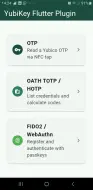
Flutter plugin for YubiKey hardware authentication. Supports OTP, OATH TOTP/HOTP, FIDO2/WebAuthn and HMAC-SHA1 Challenge-Response over NFC, built on the official Yubico yubikit-android SDK.
yubikey_flutter #


Flutter plugin for YubiKey authentication, built on top of the official Yubico YubiKit Android SDK.
Supports:
- OTP — read Yubico OTP via NFC tap
- OATH TOTP/HOTP — list credentials and calculate codes
- FIDO2 / WebAuthn — hardware-backed passkey registration and authentication
- HMAC-SHA1 Challenge-Response — hardware-bound key derivation (e.g. for encrypting local data with a YubiKey-backed secret)
Unlike other community packages, this plugin wraps the official yubikit-android SDK directly, ensuring full protocol support and long-term compatibility.
Platform support #
| Android | iOS |
|---|---|
| ✅ | 🔜 Roadmap |
Installation #
dependencies:
  yubikey_flutter: ^0.1.0
Android permissions #
Add to your AndroidManifest.xml:
<uses-permission android:name="android.permission.NFC" />
<uses-feature android:name="android.hardware.nfc" android:required="false" />
Usage #
Check NFC availability #
final yubikey = YubikeyPlugin();

final supported = await yubikey.isNfcSupported();
final enabled   = await yubikey.isNfcEnabled();
Listen for YubiKey connection events #
yubikey.onYubikeyConnected.listen((info) {
  print('Connected: ${info.deviceName} (${info.connectionType})');
  print('Serial: ${info.serialNumber}');
  print('Firmware: ${info.firmwareVersion}');
});
Read OTP #
try {
  final result = await yubikey.readOtp(timeout: 30);
  print('OTP: ${result.otp}');
} on YubikeyTimeoutException {
  print('No YubiKey detected within timeout');
} on YubikeyException catch (e) {
  print('Error ${e.code}: ${e.message}');
}
OATH — list credentials and calculate codes #
// List all credentials stored on the YubiKey
final credentials = await yubikey.listOathCredentials();
for (final cred in credentials) {
  print('${cred.displayName} (${cred.oathType.name})');
}

// Calculate all codes in a single NFC tap
final codes = await yubikey.calculateAllOathCodes();
for (final code in codes) {
  print('${code.credentialId}: ${code.code} (expires in ${code.remainingSeconds}s)');
}

// Calculate code for a specific credential
final code = await yubikey.calculateOathCode(credentials.first.id);
print('Code: ${code.code}');
Challenge-Response (HMAC-SHA1) #
import 'dart:typed_data';

// Send a challenge to the YubiKey and get the HMAC-SHA1 response.
// Useful for key derivation (e.g., encrypting local data with a hardware-bound key).
final challenge = Uint8List.fromList(List.generate(32, (i) => i)); // your challenge bytes
final responseHex = await yubikey.challengeResponse(
  challenge: challenge,
  slot: 2, // default: Slot 2
);
print('HMAC response: $responseHex'); // 40-char hex string
FIDO2 — registration #
// Challenge must come from your server
final reg = await yubikey.fido2Register(
  rpId:      'example.com',
  rpName:    'My App',
  userId:    'user-unique-id',
  userName:  'user@example.com',
  challenge: serverChallenge, // base64url encoded
);

// Send to your server for verification:
print('Credential ID: ${reg.credentialId}');
print('Attestation:   ${reg.attestationObject}');
FIDO2 — authentication #
final assertion = await yubikey.fido2Authenticate(
  rpId:               'example.com',
  challenge:          serverChallenge, // base64url encoded
  allowCredentialIds: [registeredCredentialId],
);

// Send to your server for verification:
print('Signature: ${assertion.signature}');
Error handling #
All methods throw typed subclasses of YubikeyException:
| Exception | When |
|---|---|
YubikeyNfcDisabledException |
NFC is off in device settings |
YubikeyNfcNotSupportedException |
Device has no NFC hardware |
YubikeyTimeoutException |
No YubiKey detected within timeout |
YubikeyCancelledException |
Operation cancelled |
YubikeyInvalidPinException |
Wrong PIN (includes retriesRemaining) |
YubikeyPinLockedException |
PIN locked after too many attempts |
YubikeyNoCredentialsException |
No credentials found on device |
How it works #
This plugin uses Flutter platform channels to bridge the Dart layer with the native Android Kotlin layer, where yubikit-android handles all YubiKey communication over NFC.
Flutter (Dart) ──► MethodChannel ──► Kotlin ──► yubikit-android ──► YubiKey
Contributing #
Pull requests welcome. This plugin is maintained by Luckysistemi.
License #
MIT — see LICENSE
Metadata

Documentation
Publisher
unverified uploader
Weekly Downloads
Metadata
Flutter plugin for YubiKey hardware authentication. Supports OTP, OATH TOTP/HOTP, FIDO2/WebAuthn and HMAC-SHA1 Challenge-Response over NFC, built on the official Yubico yubikit-android SDK.
Homepage
Repository (GitHub)
View/report issues
Topics
#yubikey #fido2 #webauthn #authentication #nfc
License
 MIT (license)
Dependencies
flutter, plugin_platform_interface
More
Packages that depend on yubikey_flutter
Packages that implement yubikey_flutter