
external_display 0.4.3  external_display: ^0.4.3 copied to clipboard
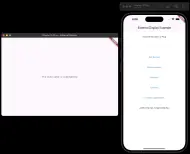
The Flutter plugin supports connecting to an external display via wired or wireless connections. The main view and the external display view can exchange data with each other.
lib/main.dart #
import 'package:flutter/material.dart';
import 'package:external_display/external_display.dart';
import 'external_display.dart';

void main() {
  // Entry point of the main app
  runApp(const MyApp());
}

@pragma('vm:entry-point')
void externalDisplayMain() {
  // Entry point for the external display window
  runApp(const MaterialApp(onGenerateRoute: generateRoute));
}

class MyApp extends StatelessWidget {
  const MyApp({super.key});

  @override
  Widget build(BuildContext context) {
    // Set Home as the main page
    return const MaterialApp(home: Home());
  }
}

class Home extends StatefulWidget {
  const Home({super.key});

  @override
  State<Home> createState() => _HomeState();
}

class _HomeState extends State<Home> {
  List<String> screens = []; // screen info
  String state = "Unplug"; // External display state
  String resolution = ""; // External display resolution

  // Callback when external display status changes
  onDisplayChange(connecting) async {
    if (connecting) {
      state = "Plug";
      setState(() {});
    } else {
      setState(() {
        state = "Unplug";
        resolution = "";
      });
    }
  }

  // Callback for receiving parameters from external display
  receiveParameterListener({required String action, dynamic value}) {
    debugPrint("Main View receive parameter action: $action");
    debugPrint("Main View receive parameter value: $value");
  }

  @override
  void initState() {
    super.initState();
    externalDisplay.addStatusListener(onDisplayChange);
    externalDisplay.addReceiveParameterListener(receiveParameterListener);
  }

  @override
  Widget build(BuildContext context) {
    return Scaffold(
        appBar: AppBar(
          title: const Text('External Display Example'),
        ),
        body: Container(
          color: Colors.white,
          child: Column(children: [
            // Show external display state
            Container(
                height: 70,
                alignment: Alignment.center,
                child: Text("External Monitor is $state")),
            // Show screen info
            Container(
                height: 70,
                alignment: Alignment.center,
                child: Text(screens.join(", "))),
            // Button to get screen info
            Container(
              height: 70,
              alignment: Alignment.center,
              child: TextButton(
                  style: ButtonStyle(
                    foregroundColor:
                        WidgetStateProperty.all<Color>(Colors.blue),
                  ),
                  onPressed: () async {
                    screens = await externalDisplay.getScreen();
                    setState(() {});
                  },
                  child: const Text("Get Screen")),
            ),
            // Button to create external display window
            Container(
              height: 70,
              alignment: Alignment.center,
              child: TextButton(
                  style: ButtonStyle(
                    foregroundColor:
                        WidgetStateProperty.all<Color>(Colors.blue),
                  ),
                  onPressed: () async {
                    await externalDisplay.createWindow(title: "Testing");
                  },
                  child: const Text("Create window")),
            ),
            // Button to connect to external display and send parameters
            Container(
              height: 70,
              alignment: Alignment.center,
              child: TextButton(
                  style: ButtonStyle(
                    foregroundColor:
                        WidgetStateProperty.all<Color>(Colors.blue),
                  ),
                  onPressed: () async {
                    await externalDisplay.connect();
                    externalDisplay.waitingTransferParametersReady(onReady: () {
                      print("First transfer parameters ready!");
                      externalDisplay.sendParameters(
                          action: "testing", value: {"c": "cat", "d": "dog"});
                    }, onError: () {
                      print("First transfer parameters fail!");
                    });
                    setState(() {
                      resolution =
                          "width:${externalDisplay.resolution?.width}px, height:${externalDisplay.resolution?.height}px";
                    });
                  },
                  child: const Text("Connect")),
            ),
            // Button to connect to external display with routeName
            Container(
              height: 70,
              alignment: Alignment.center,
              child: TextButton(
                  style: ButtonStyle(
                    foregroundColor:
                        WidgetStateProperty.all<Color>(Colors.blue),
                  ),
                  onPressed: () async {
                    await externalDisplay.connect(routeName: "Testing");
                    setState(() {
                      resolution =
                          "width:${externalDisplay.resolution?.width}px, height:${externalDisplay.resolution?.height}px";
                    });
                  },
                  child: const Text("Connect")),
            ),
            // Button to transfer parameters
            Container(
              height: 70,
              alignment: Alignment.center,
              child: TextButton(
                  style: ButtonStyle(
                    foregroundColor:
                        WidgetStateProperty.all<Color>(Colors.blue),
                  ),
                  onPressed: () async {
                    await externalDisplay.sendParameters(
                        action: "testing", value: {"a": "apple", "b": "boy"});
                  },
                  child: const Text("Transfer parameters")),
            ),
            // Show resolution
            Container(
                height: 70,
                alignment: Alignment.center,
                child: Text(resolution))
          ]),
        ));
  }
}
lib/external_display.dart #
import 'package:flutter/material.dart';
import 'package:external_display/transfer_parameters.dart';
import 'package:path_provider/path_provider.dart';

// Function to generate route for external display view
Route<dynamic> generateRoute(RouteSettings settings) {
  // Create a TransferParameters instance for communication
  TransferParameters transferParameters = TransferParameters();

  // Add listener to receive parameters from main view
  transferParameters.addListener(({required action, value}) {
    debugPrint("External View receive parameter action: $action");
    debugPrint("External View receive parameter value: $value");

    // Send parameters back to main view
    transferParameters.sendParameters(
        action: "sendParameters", value: "form external view");
  });

  // Get application documents directory and print its path
  getApplicationDocumentsDirectory().then((path) {
    debugPrint(path.path);
  });

  // Return a MaterialPageRoute with a simple scaffold showing the route name
  return MaterialPageRoute(
      builder: (_) => Scaffold(
            body: Center(child: Text('The route name is: ${settings.name}')),
          ));
}
Metadata
6
likes
145
points
1.54k
downloads

Documentation
Publisher
unverified uploader
Weekly Downloads
Metadata
The Flutter plugin supports connecting to an external display via wired or wireless connections. The main view and the external display view can exchange data with each other.
Homepage
Repository (GitHub)
View/report issues
Topics
#uiscreen #presentation #secondary-display #screen-mirroring #display-manager
License
 BSD-3-Clause (license)
Dependencies
More
Packages that depend on external_display
Packages that implement external_display