
settings_ui 4.0.0  settings_ui: ^4.0.0 copied to clipboard
 yako.dev
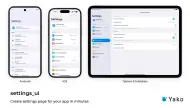
Settings screens that look native on iOS, Android, macOS, Windows, Linux (GNOME) and the web, from one API, with sub-pages and a split view for tablets and desktop.
Settings UI for Flutter #


Add it with your coding agent #
Paste this into Claude Code, Codex, Cursor or another coding agent, from your app's root folder. The agent reads the package's recipe in llms.txt, looks at your app, asks before big changes, and builds a settings screen wired to real, saved state.
Add a settings screen to this Flutter app with the settings_ui package.
Read the section "Recipe: build a settings screen for an app" in
https://raw.githubusercontent.com/yako-dev/flutter-settings-ui/master/llms.txt
and follow it step by step. If you can't open the link, tell me.

Always:
- Pick the version by the app's imports: package:material_ui or package:cupertino_ui
  -> settings_ui: ^4.0.0; package:flutter/material.dart -> settings_ui: ^3.0.1.
- Show me your plan and wait for my OK before adding dependencies or screens.
- Never invent URLs or email addresses (privacy policy, terms, support). Ask me.
Full prompt (if your agent can't open links)
Build a store-ready Settings screen for this Flutter app with the settings_ui package.
First read https://raw.githubusercontent.com/yako-dev/flutter-settings-ui/master/llms.txt (API,
platform differences and mistakes to avoid). If you can't fetch it, read the package source after
`flutter pub get`.

1. Inspect the app before changing anything, and tell me what you found:
   - Flutter version and UI imports. package:material_ui / package:cupertino_ui -> settings_ui: ^4.0.0.
     package:flutter/material.dart -> settings_ui: ^3.0.1. Don't migrate the app unless I ask.
   - The platforms it ships (ios/, android/, macos/, windows/, linux/, web/), and tablet support.
   - State management, persistence (shared_preferences, Hive, secure storage...), localization,
     routing, and whether the app supports light/dark/system theme modes.
   - Existing preferences and feature flags, sign-up/sign-in, in-app purchases, permissions in
     ios/Runner/Info.plist and android/app/src/main/AndroidManifest.xml, and any existing settings UI.
2. Propose grouped sections that follow Apple HIG and Material conventions (for example: account,
   appearance, notifications, privacy, support, about; destructive actions last). For each row give
   the tile type, the state behind it and where it is stored. If the app runs on tablets, desktop or
   the web, propose SettingsSplitView (list and page side by side). Wait for my OK before adding
   dependencies, adding screens or moving existing code.
3. Build it with settings_ui, following the app's existing patterns:
   - SettingsTile.switchTile for on/off, SettingsTile.navigation for rows that open a page or
     picker, plain SettingsTile for values and actions (no chevron). Section titles in sentence case.
   - Settings sub-pages: `destination: SettingsDestination(id: ..., builder: ...)` on the navigation
     tile. The builder returns only the body; the package draws the header and back button.
   - Wire every row to real state that survives a restart. No placeholder rows, empty handlers or
     TODOs. Permission rows show the real OS status and open system settings when denied.
   - Use the app's localization for strings and its router for other screens. Leave `platform`
     unset, so iOS, Android, macOS, Windows, Linux and the web each get their own style.
4. Add these rows when they apply. Ask me for URLs and emails; never invent them.
   - Version and build number (package_info_plus). Open-source licenses (showLicensePage).
   - Privacy policy, terms of use and contact support (url_launcher).
   - Restore purchases, if the app sells subscriptions or non-consumable purchases.
   - Sign out and Delete account, if users can create accounts. Deletion starts in the app, asks for
     confirmation and calls the real backend (App Store Review Guideline 5.1.1(v); Google Play has a
     similar rule).
5. Add widget tests: the screen renders in the style of every platform the app ships
   (TargetPlatformVariant), every toggle persists, links and actions fire, and a split view shows
   one pane at 402x874 and two at 1210x834 (tester.view.physicalSize).
6. Run `flutter analyze` and `flutter test`. Then run the app on an iOS simulator and an Android
   emulator, plus iPad, desktop or web if the app ships there, in light and dark mode
   (`xcrun simctl ui booted appearance dark`, `adb shell cmd uimode night yes`), and screenshot
   the settings screen each time (`xcrun simctl io booted screenshot`,
   `adb exec-out screencap -p`). Fix anything clipped, misaligned or hard to read. If you can't
   launch a device, tell me what to run.
7. Summarize: files changed, dependencies added, each row with its state and storage key, tests
   added, screenshot paths, and anything I still need to provide.
More prompts, to upgrade from 3.x, replace a hand-built settings screen, add one setting end to end, add a split view, or audit a screen: see agent prompts.
One API, every platform #
settings_ui draws iOS 26 and Android 16 settings on phones, macOS System Settings, Windows 11 and GNOME on the desktop, and Chrome's settings page on the web, and picks the style at runtime. Version 4.0.0 adds a split view for iPad, tablets, foldables, desktop and the web, and its own switches for iOS 26 (Liquid Glass), macOS, Windows 11 and GNOME. It is built on material_ui and cupertino_ui and needs Flutter 3.44+. See the changelog.
Install #
dependencies:
  settings_ui: ^4.0.0
Version 4 needs Flutter 3.44+ and an app built on material_ui and cupertino_ui (import 'package:material_ui/material_ui.dart', not package:flutter/material.dart). If your code imports them, add them to your own pubspec.yaml too: flutter pub add material_ui cupertino_ui. Apps still on package:flutter/material.dart stay on settings_ui: ^3.0.1, or see Migrating from 3.x.
Quick start #
import 'package:material_ui/material_ui.dart';
import 'package:settings_ui/settings_ui.dart';

class SettingsScreen extends StatefulWidget {
  const SettingsScreen({super.key});

  @override
  State<SettingsScreen> createState() => _SettingsScreenState();
}

class _SettingsScreenState extends State<SettingsScreen> {
  bool _notifications = true; // load from and save to your store

  @override
  Widget build(BuildContext context) {
    return Scaffold(
      appBar: AppBar(title: const Text('Settings')),
      body: SettingsList(
        sections: [
          SettingsSection(
            title: const Text('General'),
            tiles: [
              SettingsTile.navigation(
                leading: const Icon(Icons.language),
                title: const Text('Language'),
                value: const Text('English'),
                onPressed: (context) {/* open a language picker */},
              ),
              SettingsTile.switchTile(
                leading: const Icon(Icons.notifications),
                title: const Text('Notifications'),
                initialValue: _notifications,
                onToggle: (value) => setState(() => _notifications = value),
              ),
            ],
          ),
          SettingsSection(
            title: const Text('About'),
            tiles: [
              SettingsTile(
                title: const Text('Version'),
                value: const Text('1.4.0 (57)'),
              ),
              SettingsTile.navigation(
                title: const Text('Open-source licenses'),
                onPressed: (context) => showLicensePage(context: context),
              ),
            ],
          ),
        ],
      ),
    );
  }
}
SettingsTile.switchTilefor on/off. It is controlled:initialValueis the current value andonTogglegets the new one. Screen readers announce the switch with the tile's title.SettingsTile.navigationfor rows that open a page or a picker. It shows a chevron in the iOS, macOS, Windows and web styles.SettingsTilefor a value or an action, with no chevron.CustomSettingsTileandCustomSettingsSectionfor any other widget. Write section titles in sentence case.enabled: falsegreys out any tile, and it ignores taps and the keyboard.
Split view #
On iPad, tablets, foldables, desktop and the web, use SettingsSplitView as the whole screen (no app bar above it) and give each navigation tile a SettingsDestination. Wide windows show the list and the page side by side; phones push the page over the list. The package draws each platform's page header and back button, so builder returns only the body.
SettingsSplitView(
  title: const Text('Settings'),
  sections: [
    SettingsSection(
      tiles: [
        SettingsTile.navigation(
          leading: const Icon(Icons.wifi),
          title: const Text('Network & internet'),
          destination: SettingsDestination(
            id: 'network',
            builder: (context) => const NetworkSettings(),
          ),
        ),
        SettingsTile.navigation(
          leading: const Icon(Icons.brightness_medium),
          title: const Text('Display'),
          destination: SettingsDestination(
            id: 'display',
            builder: (context) => const DisplaySettings(),
          ),
        ),
      ],
    ),
  ],
)
Each style follows its platform's Settings app: two panes on iPads in both orientations, on Android tablets and unfolded foldables, and above 980px on the web; on the desktop, the sidebars of System Settings, Windows 11 Settings and GNOME Settings. Pages keep their state when a device folds, unfolds or rotates; system back, Android predictive back and the iOS back swipe work; hinges and right-to-left layouts are handled. A destination works in a plain SettingsList too: the tile pushes its page. For deep links and URL sync, see SettingsSplitController and onDestinationChanged in the API reference.
Platform gallery #
 |
 |
| iOS 26 | Android 16 |
 |
 |
| iPad, split view | Foldable, split view |
 |
 |
| macOS System Settings | Windows 11 |
 |
 |
| Linux (GNOME) | Web (Chrome) |
The style follows the platform the app runs on, and every browser gets the web style. To use one style everywhere, set platform, for example SettingsList(platform: DevicePlatform.iOS, ...).
API overview #
| Class | What it is |
|---|---|
SettingsList |
The scrolling list of sections. Optional: platform, brightness, applicationType, lightTheme and darkTheme, contentPadding, crossAxisAlignment, scrollController, shrinkWrap, physics |
SettingsSection |
A group of tiles with an optional title. CustomSettingsSection takes any widget |
SettingsTile |
SettingsTile(), .navigation() and .switchTile(), with title, leading, trailing, value, description, titleDescription, onPressed, enabled, compact. CustomSettingsTile takes any widget |
SettingsDestination |
The page a navigation tile opens: id, builder, title, actions |
SettingsSplitView |
The list and the selected page side by side. SettingsSplitController selects pages from code |
SettingsThemeData |
Colors and text styles for light and dark mode, over each style's defaults |
CupertinoSettingsSwitch, MacosSettingsSwitch, FluentSettingsSwitch, AdwaitaSettingsSwitch |
The iOS 26, macOS, Windows 11 and GNOME switches, which you can also use on their own. AdwaitaPanDownIcon is the arrow of GNOME combo rows |
The Android and web styles take their colors from your Material 3 ColorScheme; the iOS, macOS, Windows and GNOME styles use their platforms' own colors. Light and dark mode follow your app theme in every style, and brightness forces one; in a CupertinoApp, pass applicationType: ApplicationType.cupertino so they follow the CupertinoTheme.
- Every parameter: API reference on pub.dev.
- Each style's look, where
valueanddescriptionshow on each platform, how taps work on switch tiles, theme fields and testing:llms.txt. - Every style and the split view in a running app: the example app (
cd example && flutter run --route '/split-view?platform=android&theme=dark').
Migrating from 3.x #
The settings_ui API didn't change: 4.0.0 only adds to it. What changes is the UI library your app uses, and the look.
- Flutter 3.44+ and Dart 3.12+. If your app can't move yet, stay on
settings_ui: ^3.0.1. - Move the app to
material_uiandcupertino_ui. Run the import migration from thematerial_uiREADME (dart fix --apply --code=migrate_design_widgets) onlib/,test/andintegration_test/, and add both packages to yourpubspec.yaml(flutter pub add material_ui cupertino_ui). Dependencies that still importpackage:flutter/material.dartcan be wrapped inMaterialUiCompatibilityBridgeorCupertinoUiCompatibilityBridge. - Set
settings_ui: ^4.0.0. Your settings screens compile as they are. - Update tests that find switches. Switch tiles now show
CupertinoSettingsSwitchon iOS,MacosSettingsSwitchon macOS andFluentSettingsSwitchon Windows, where 3.x showed aCupertinoSwitch, andAdwaitaSettingsSwitchon Linux, where it showed a MaterialSwitch. - Write section titles in sentence case, like iOS 26. If you passed ALL-CAPS titles for the old iOS look, change them.
- Check the new look. Sizes, paddings and default colors changed (a list in a side panel or a narrow pane now gets less side padding, because the padding follows the list's own width), and macOS, Windows and Linux have their own styles now (3.x used the iOS style on macOS and Windows, the Android style on Linux). Colors you set in
SettingsThemeDatastill win. To keep one style on every platform, setplatform. - Remove 3.x workarounds, such as a
trailing: Text(...)added because iOS simple tiles didn't showvalue.
If a debug build prints settings_ui: SettingsList found no Theme, that screen still sits under a package:flutter/material.dart app or theme.
A coding agent can do the upgrade: use the "Upgrade settings_ui 3.x to 4.0" prompt in agent prompts.
Known issues #
- iOS, VoiceOver: after a
SettingsSplitViewchanges layout (rotation, an iPad window resize), VoiceOver can misplace the rows' frames until the app restarts. It is a Flutter engine bug; touch input is not affected.
License #
Apache License 2.0. See the LICENSE file for details.
Metadata

Documentation
Publisher
Weekly Downloads
Metadata
Settings screens that look native on iOS, Android, macOS, Windows, Linux (GNOME) and the web, from one API, with sub-pages and a split view for tablets and desktop.
Repository (GitHub)
View/report issues
Topics
#settings #preferences #ui #widget #adaptive
License
 Apache-2.0 (license)
Dependencies
cupertino_ui, flutter, material_ui